Vehicle Diagnostics in Contemporary E/E Architecture
How to Efficiently Acquire, Specify, and Implement Diagnostic Data in Software
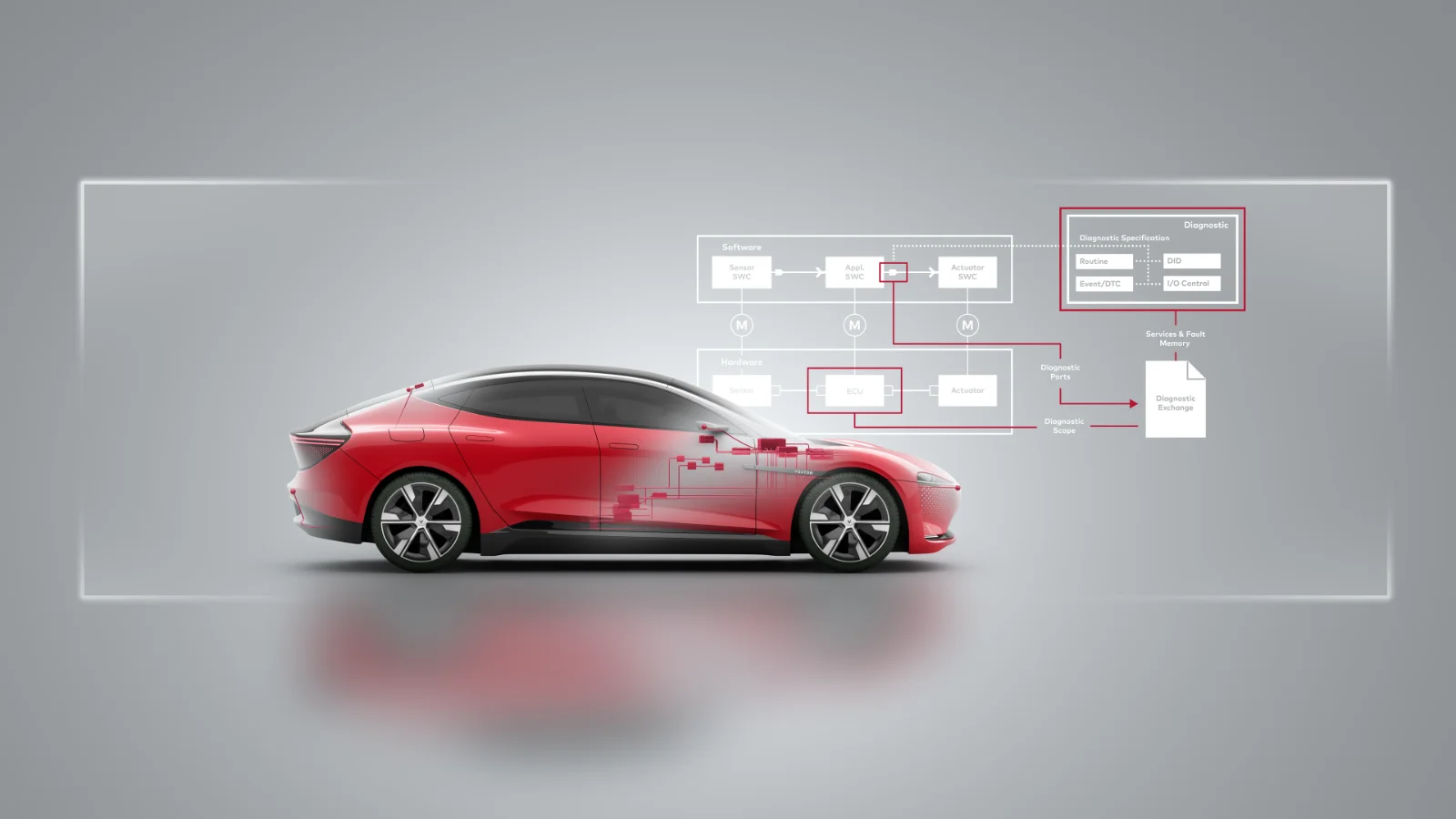
In typical automotive development processes, diagnostic descriptions and software implementations exist in silos. Different people use different authoring tools. You verify consistency manually, inviting errors and slowing down progress. An integrated, model-driven approach changes this. We show you how to describe diagnostics directly within your vehicle E/E system and link them seamlessly to your implementation software.
In vehicle diagnostics projects, teams often decouple the diagnostic specification from software development. Engineers specify large parts of the software and E/E system long before considering diagnostics for production lines or service workshops. Responsibilities fall to different departments. Engineers use isolated tools. They lack a common database. Teams exchange information informally through emails or meetings, making ad hoc changes without standardized synchronization.
To build future-proof vehicles, we believe a successful diagnostic design considers the entire lifecycle. Production and customer service experts focus on parameterizing testers. System developers focus on the internal design of the vehicle software. Often, these groups view each other’s needs as secondary.
Yet, undeniable dependencies exist. If datatype definitions in the diagnostic specification differ from the implemented application software, inconsistencies arise. You face these issues late in configuring AUTOSAR basic software components like the Diagnostic Event Manager (DEM) and Diagnostic Communication Manager (DCM). Discovering errors during ECU start-up drains resources. The rule of engineering dictates: late error detection increases correction costs exponentially.
Bridge the Gap with Model-Based Integration
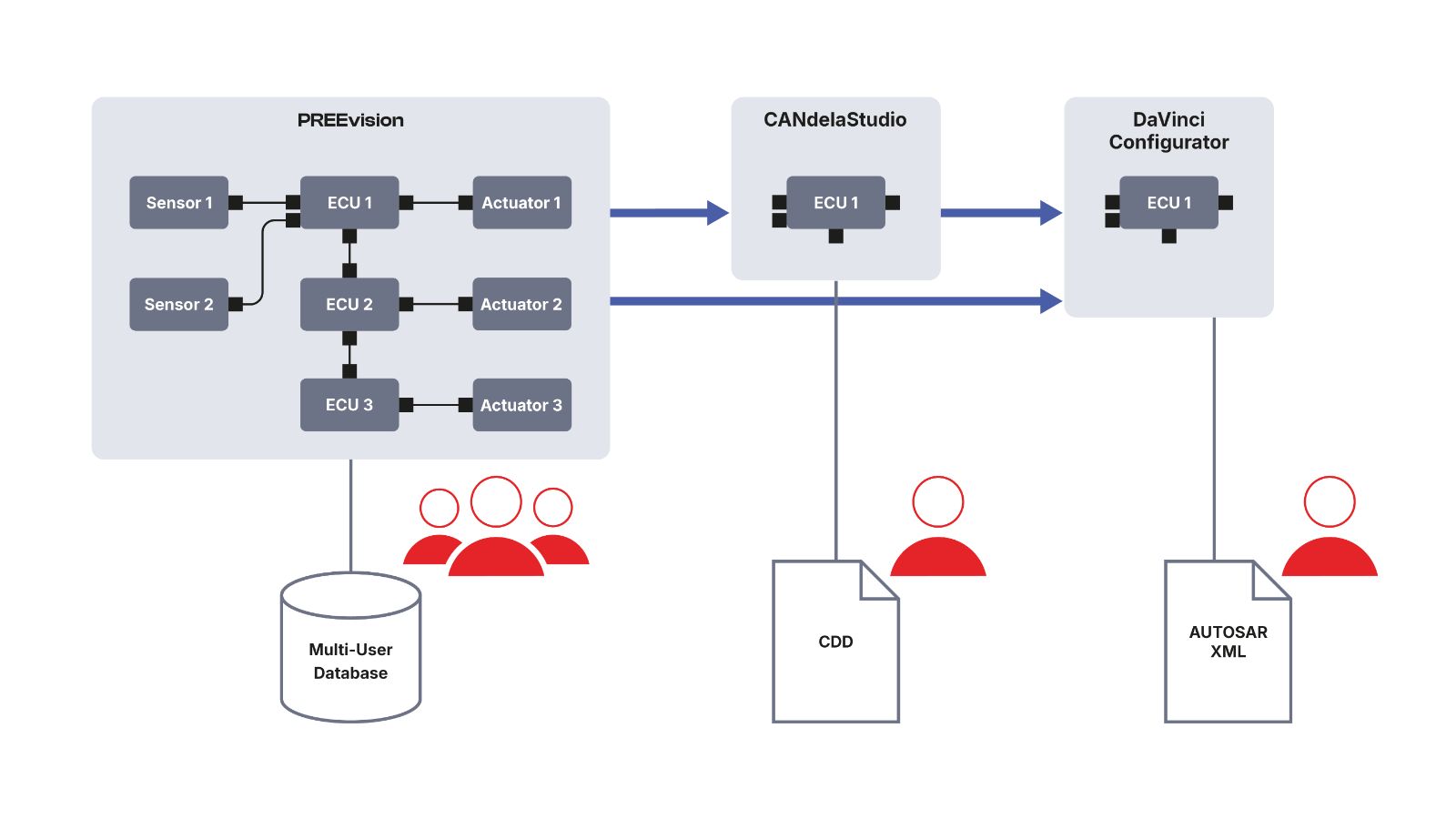
We provide an efficient method to overcome these challenges. Vector enables a seamless integration between two powerful tools. You develop diagnostic and software concepts in the model-based PREEvision environment, and you exchange all relevant data with CANdelaStudio to create formal diagnostic specifications.
A higher-level E/E data model guarantees technical consistency across system requirements, software architecture, hardware components, and wire harnesses. You map all interrelationships in a shared database. When a technical change occurs, the update becomes immediately visible to all affected developers. You recognize potential conflicts early. You track release points through robust versioning. You manage variants effortlessly, describing identical parts and differences in one place to support modular software stacks.
Master Dependencies Between Diagnostics and Software
What dependencies connect ECU software and diagnostic descriptions? Authoring tools often describe diagnostic functions from the external tester's perspective. They detail the Diagnostic Trouble Codes (DTCs) a tester reads from a fault memory, or the Data Identifiers (DIDs) an ECU provides. They define datatypes, conversions, and physical units.
The application software implements these provisions via diagnostic ports. For a DID data object, this means a specific data element assigned a datatype, a conversion formula, and a unit. AUTOSAR-conformant modeling distributes these details among multiple objects. For example, you use a single DID to access several temperatures transferred by multiple software ports. Despite differing granularity, the informational content remains consistent.
Define diagnostics and software together. You eliminate redundancies. You describe datatypes in the software, and the diagnostic description references them. Or, you define diagnostic contents first and use that detailed information for the software implementation.
Implement Specifics in a Unified Tool Chain
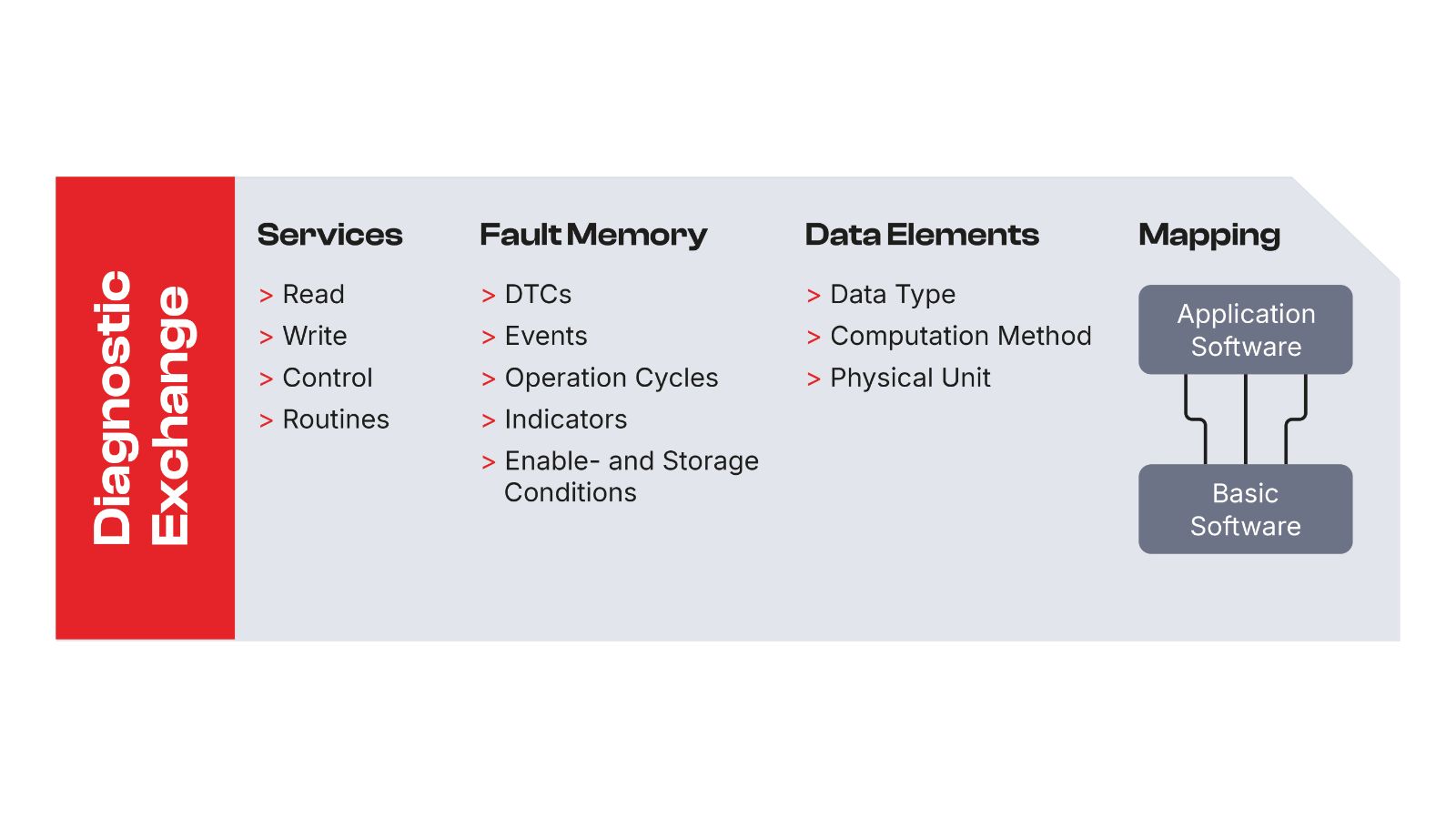
Diagnostic specifications dictate requirements for the application software. A diagnostic routine requires a software component to implement it. A DTC requires monitoring functionality. AUTOSAR sets strict structural requirements. I/O control demands a record type for monitored data. A routine requires a client/server interface. Define these structures once and use them for both domains.
We extended PREEvision with a dedicated abstraction layer for diagnostics. You describe diagnostic objects system-wide and link them to the application software. You define DIDs, I/O controls, routines, and AUTOSAR event-handling elements like DiagnosticEvents and OperationCycles. You establish a bidirectional data exchange with CANdelaStudio to support cooperative working models.
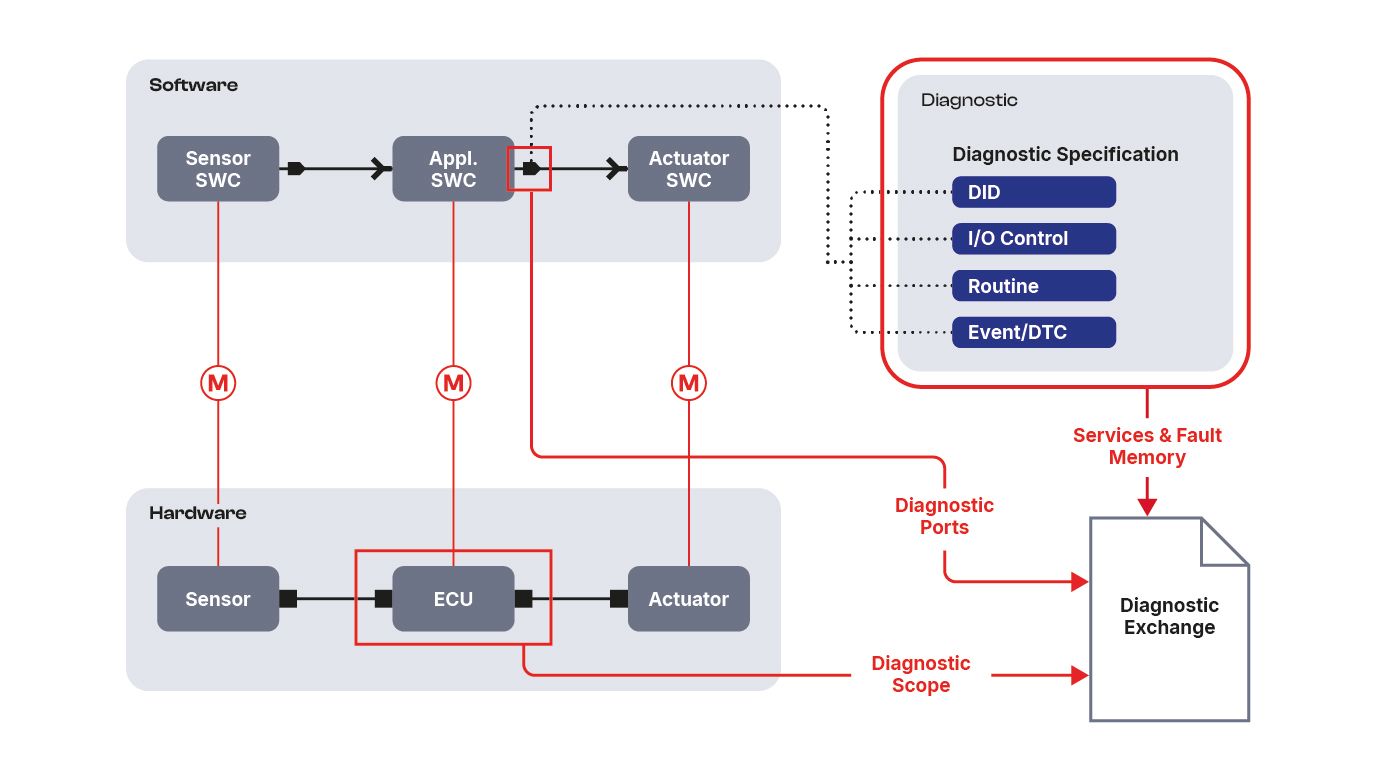
Return data flow to PREEvision empowers you to use master data from existing diagnostic descriptions as a starting point. We chose a file-based approach to enable exchanges across organizational boundaries. The exchange file contains diagnostic objects and associated software details.
Information on allocating the diagnostic object to the application software port travels via a reference. In a basic software configuration tool, the integrator skips manual port-mapping. The system determines connections automatically based on references. You save time and reduce errors.
Assure AUTOSAR Conformity Automatically
The AUTOSAR standard strictly defines software component descriptions for diagnostics. Internalizing this extensive standard takes time. PREEvision generates diagnostic ports directly from the diagnostic object, ensuring strict AUTOSAR conformity. If you make subsequent changes that deviate from the standard, the tool alerts you immediately. You achieve real-time performance in your quality assurance.
Key Takeaways for Your Overall Development Process
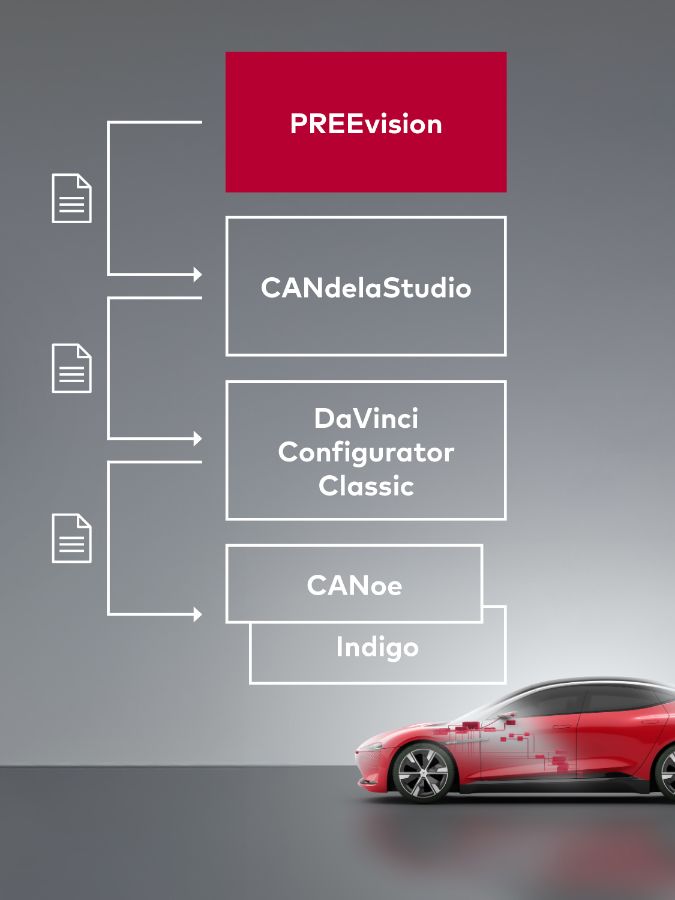
You manage all data centrally. You view diagnostics system-wide. You export diagnostic contents for an ECU, refine them in CANdelaStudio, and generate the AUTOSAR Diagnostic Extract (DEXT) or ODX formats. You read the system description and DEXT into DaVinci Configurator. This process delivers clear advantages:
- Skip the manual merging of diagnostic objects with diagnostic ports. References automate the allocation.
- Rely on automatically modeled, AUTOSAR-conformant diagnostic ports.
- Align properties of diagnostic ports with diagnostic objects perfectly to prevent data type conflicts.
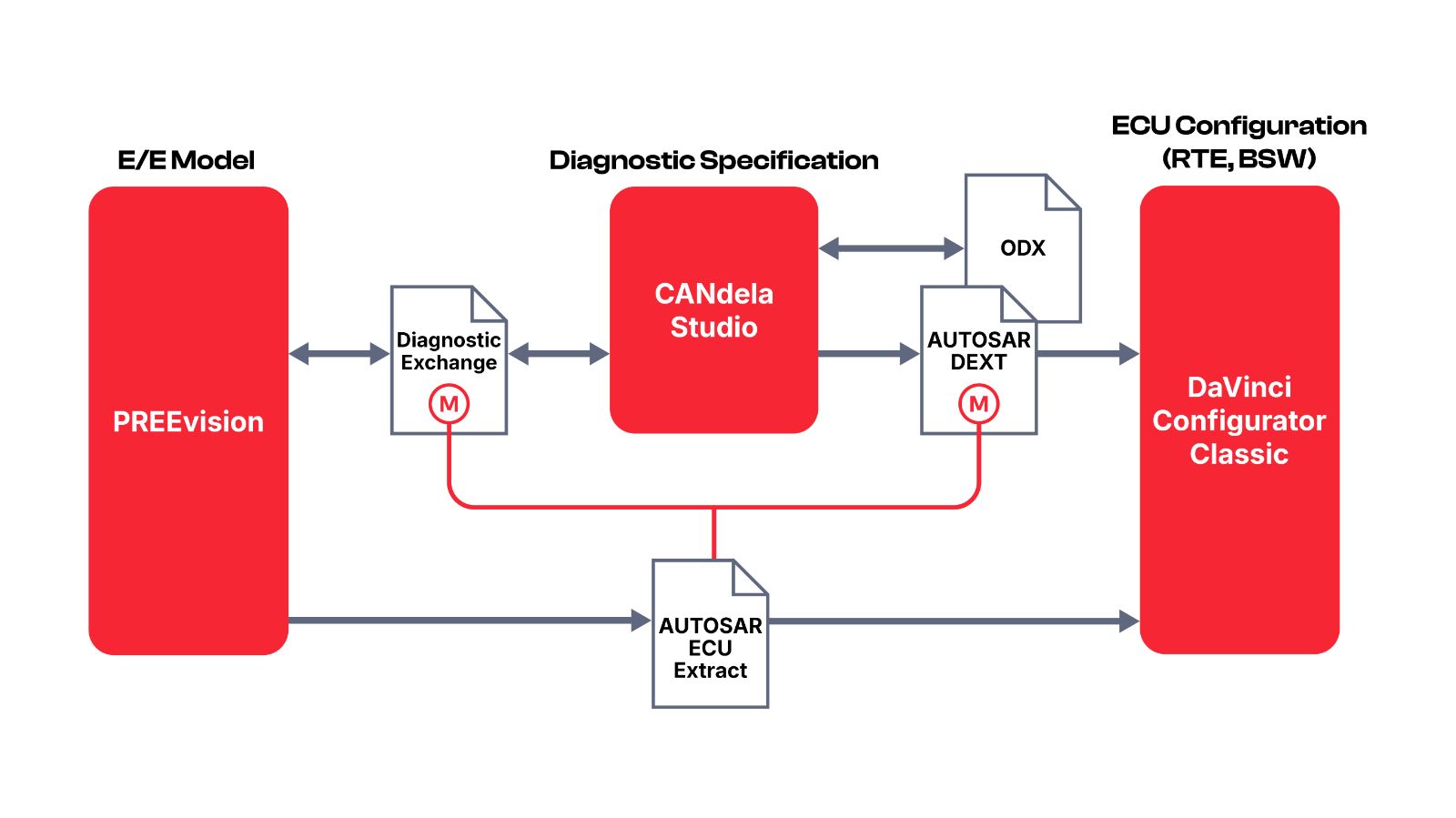
This integration lowers coordination effort, reduces manual work, and eliminates potential errors. You derive diagnostic data automatically from other model levels, such as generating test sequences directly from wire harness designs.
We invite you to embrace this model-based approach. Foster team spirit across your departments, integrate cybersecurity and diagnostics seamlessly into your architecture, and build momentum for true innovation. Achieve engineering excellence with Vector.