CANoe.ADAS
CANoe.ADAS provides comprehensive support for analyzing, simulating, and testing your ADAS functions. The ADAS Option for CANoe offers complete flexibility: Perform open-loop tests using sensor data from real-world driving, or conduct simulated closed-loop scenarios.
Recorded data is clearly visualized in CANoe.ADAS, for example, to verify your ADAS object detection algorithm. CANoe.ADAS also provides exactly the right inputs for stimulating your ADAS functions: Use either replay vehicle data or perform automated testing with simulated scenarios — in SIL or HIL environments.
Advantages
- Get a clear overview
Visualizing your sensor data clearly shows you what your vehicle “sees.” - Quickly validate object detection and sensor fusion
Compare raw sensor data directly with object lists from the vehicle bus. Identify discrepancies and optimization opportunities immediately.
- Efficient and reproducible testing
Easily stimulate your ADAS functions using either real bus data or synthetic scenario data with preconfigured test cases. - Leverage synergies — all in one tool
Analyze, visualize, stimulate, and test ADAS functions in a single, fully time-synchronized environment — from the initial idea to the final test.
CANoe Option ADAS - Applications
Replay and Analysis of Sensor Raw Data
Task: I would like to analyze the sensor data that I have recorded.
Solution: In the Scene Window you can visualize point clouds, radar/ultrasonic reflections from your recorded MF4 files. You can verify, if the sensors work as expected.
Visual Analysis of the Detection Algorithm
Task: I want to see, if my detection algorithm works in reality.
Solution: In the Video Window, you can see video context cam data with an overlay of raw data and bounding boxes received via bus communication.
Stimulation of (v)ECUs With Open-Loop Scenarios
Task: I would like to test my ADAS function with simple scenarios like emergency brake assist.
Solution: In the Scenario Editor you can create, load and play simple synthetic open-loop scenarios to stimulate your function or ECU in SIL or HIL setups.
Closed-Loop Simulation With Complex Scenarios
Task: I need real feedback from the vehicle under test and the environment for my ADAS function.
Solution: You can perform closed-loop testing with DYNA4, providing realistic vehicle dynamics, traffic behaviour and sensor models. Virtual test drives with DYNA4 can be used in SIL , HIL or DIL or VIL setups.
CANoe.ADAS Key Features
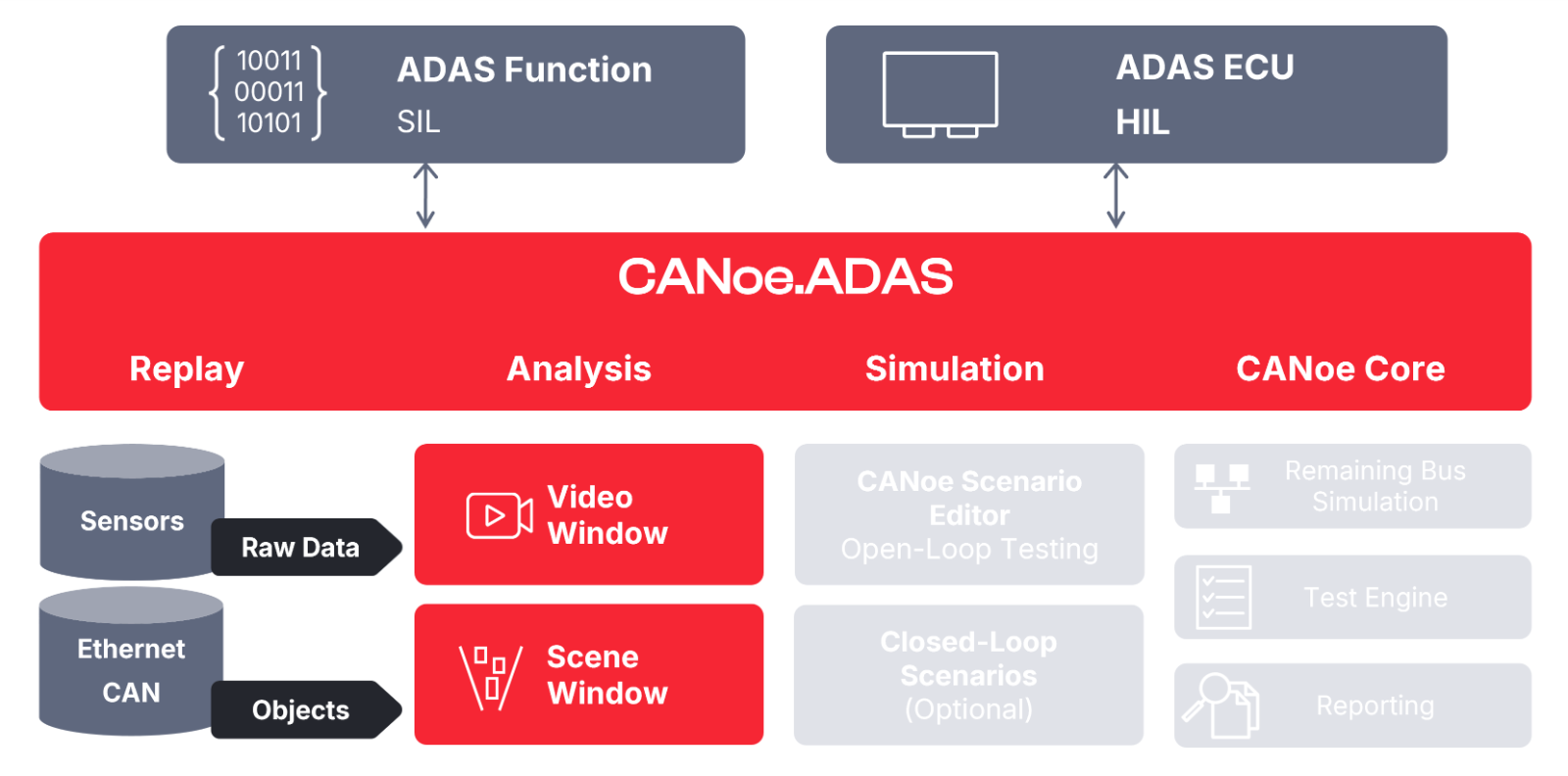
Replay and Analysis
- Replay and analysis of bus communication on object level
containing data of object detection algorithms or sensor fusion algorithms - Replay and analysis of sensor data on raw level
like radar reflections or point clouds
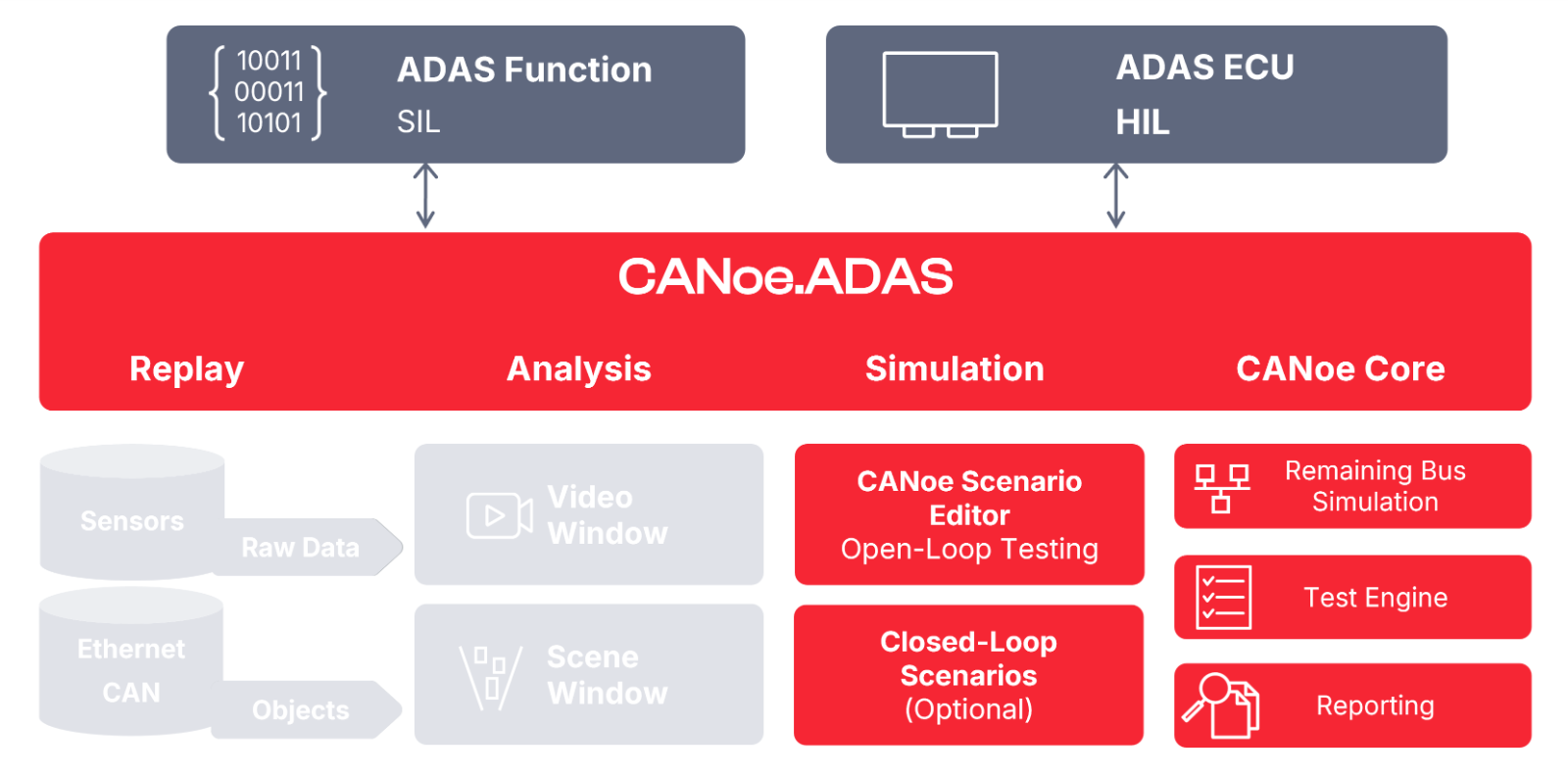
What is CANoe?
CANoe.ADAS extends the functionality of CANoe.
CANoe is the most versatile tool-platform for developing, simulating, analyzing, and testing of
- Software components or subsystems
- Electronic control units (ECUs)
- Entire distributed networks

Comparing CANoe 19 and 20 - Good Reasons to Upgrade
| Features | CANoe 19 ADAS Feature Set | CANoe 20 Option ADAS |
| Scene Window | ||
| Replay and visualize object-based ADAS data | + | + |
| Replay and visualize sensor raw data | - | + |
| Visualize radar feature data (from simulation environments like DYNA4) | - | + |
| Video Window | ||
Replay and visualize object-based ADAS data | - | + |
| Scenario Editor | ||
| Create, load and play synthetic scenario data based on geodetic map | + | + |
| Create scenario data in cartesian map (way more accurate) | - | + |
| Round curves function for way more accurate and realistic routes | - | + |
| Free positioning of objects without need of a route with greater detail and precision | - | + |
| Export scenario in OpenDRIVE/OpenSCENARIO file format (reusable in DYNA4) | - | + |
| Testing | ||
| ADAS Test Feature Set functions for vTESTstudio | + | + |