Service-oriented Vehicle Diagnostics (SOVD) provides a uniform API for diagnosing new software-based and traditional mechatronic vehicles.
The SOVD Explorer gives you a powerful way to work with the new SOVD standard – from individual vehicle components to distributed functions and the complete vehicle.
Designed for diagnostics developers, SOVD Explorer helps you understand, use, and validate SOVD implementations with confidence. You can explore available diagnostic services, interact with SOVD nodes, analyze communication, and identify deviations from the standard early in the development process. This enables you to move faster, improve implementation quality, and create diagnostics that are ready for tomorrow’s vehicle platforms for the diagnostics of Software-defined Vehicles (SDVs) – also in combination with traditional mechatronic systems.
Advantages
- Independent: Get an instant overview of the diagnostic functionality of the vehicle or all available SOVD nodes – even without description or configuration data.
- Powerful: Intuitively use all available diagnostic functions, easily read data, conveniently adjust parameters, and start vehicle actions immediately.
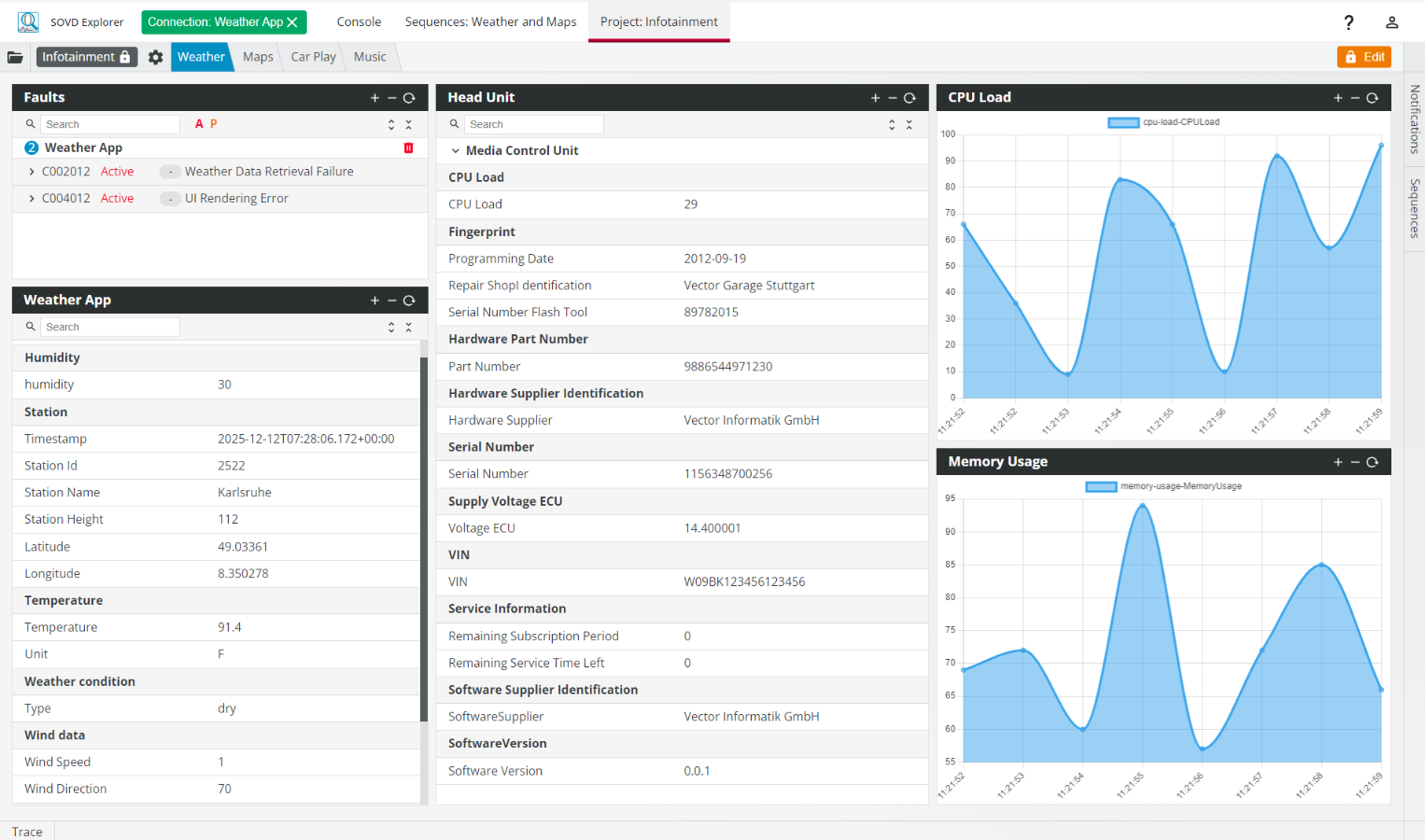
- Individual: Visualize all read data the way you want – on self-defined widget dashboards.
- Efficient: Easily automate recurring diagnostic tasks using generated SOVD sequences.
- Unrestricted: Work even with incorrect SOVD implementations but receive precise information about violations of the SOVD standard or deviations from stored description data.
- Collaborative: Share SOVD sequences, projects, and configurations with your team with a single click.
- Modern: Use the SOVD Explorer as a local desktop application or in a web browser.
Application Areas

The SOVD Explorer is designed for anyone who uses the new SOVD standard – developers and technicians at vehicle manufacturers and suppliers – whether for the entire vehicle, individual vehicle components, or functions.
With the help of the additionally available SOVD2UDS adapter, today’s UDS-based vehicles can also be diagnosed with the SOVD Explorer.
Key Features
AI-powered Diagnostics
Thanks to the integrated AI feature, users can easily diagnose connected ECUs using natural language. This speeds up troubleshooting and makes operation even easier.
Display of Diagnostic Content
SOVD Tree:
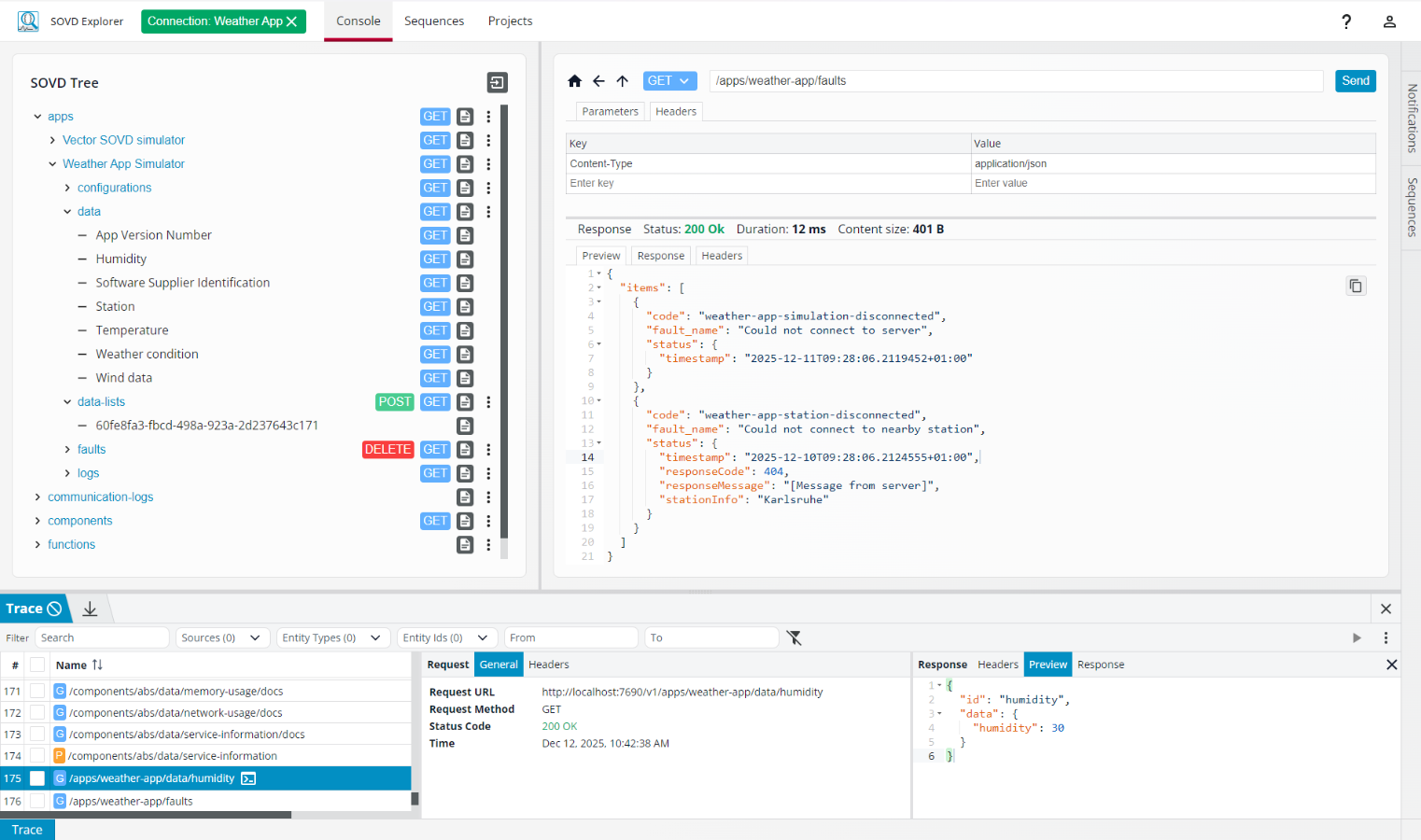
The Console (“SOVD Tree”) provides both easy access to all diagnostic data and content (SOVD resources) in a vehicle and a quick overview of all functions of the connected vehicle. SOVD schemas are displayed in the tool in a user-friendly form as OpenAPI specifications.
In addition, the SOVD Tree offers a built-in search function and direct support for SOVD software updates.
Sidebar:
A Sidebar enables centralised and intuitive management of “SOVD Locks” and “SOVD Modes.” This gives users a quick overview of operating modes and locked resources, and allows them to edit these efficiently and easily.
Individual Configurations
The dashboard/widget concept allows automated widgets to be arranged on one or more dashboards based on predefined use cases. This makes it easy to create tailor-made system-specific views for fault memory, identification data, or measurement data.
Comprehensive Communication View
With the integrated Trace Window, users can always keep track of ongoing diagnostic communication. Traces can be easily imported and exported in a standardized format. Filter options allow specific apps, components, or specific use cases to be monitored. In addition, SOVD Explorer allows recorded requests from a trace to be played back to reproduce errors in a targeted manner or to validate test cases efficiently.
Constructive Conformity Check
Based on the underlying OpenAPI schema, the SOVD Explorer provides immediate feedback on SOVD conformity. Pre-filled fields make it easier for developers to edit.
Creating Sequences
With the SOVD Explorer, users can generate sequences of SOVD requests and execute them – either directly from the structured “SOVD Tree” or based on previously recorded traces.
Team Collaboration
To work as efficiently as possible, created configurations, projects, and sequences can be easily shared with the entire team.
OpenAPI Import
Import your OpenAPI description (e.g., created with CANdelaStudio) and work based on this OpenAPI schema, even if no description or no current description is available on the SOVD server.
Videos & Images
Supported Standards
- ASAM SOVD / ISO17978-3
- DoIP (ISO 13400)
- OpenAPI
Services / Downloads