The Vector Diagnostic Scripting (VDS) library allows users to build .NET based scripts for executing diagnostic sequences or actions, which can be easily recorded and run on Vector diagnostic testers like Indigo, CANoe and on the flash tool vFlash.
Advantages
Usage
- Record own diagnostic sequences with CANoe or Indigo as simple scripts
- Automate the execution of free defined diagnostic sequences in CANoe, Indigo and vFlash
- Execute own diagnostic sequences
- Coding/parameterization of ECUs
- Directly read and analyze fault memory information (DTC, environment data, error conditions)
- Creating reports to document the ECU status and for quality assurance
- Extend tool functionality, e.g. Custom Actions* for vFlash or Custom windows for Indigo using Indigo Software Development Kit (SDK)
- Directly execute Security Access and perform diagnostic authentication together with the Vector Security Manager
Development
- Use C# as one of the most widely used programming languages to optionally extend the sequences individually
- Powerful IDE for developing and debugging the created scripts
- Access to a large number of .NET libraries and a large community that supports C# programming
The VDS Library, including many script examples, is delivered with Indigo, vFlash and CANoe.
* vFlash Custom Actions are a flexible extension of the OEM flash sequences (part of vFlash Templates). Custom Actions are executed before and/or after flashing the ECU.
Key Features
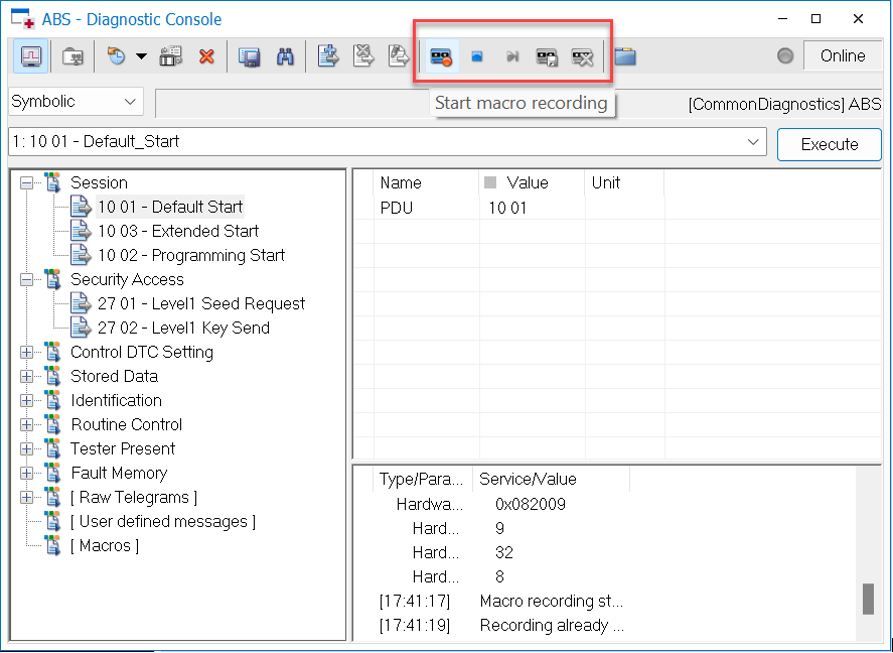
Indigo and CANoe both contain a VDS Script Recorder and a player for the recorded ready to use C# sequences.
vFlash supports the flexible extension of the fixed OEM flash sequences, part of the vFlash Template, by so-called “Custom Actions”. These scripts in C# can be executed before and/or after flashing.
Examples for typical Custom Action use cases are delivered with vFlash. These Custom Action use cases are:
- Parametrization
- Reporting for quality assurance
- Check flashware-version and update applicability
- Restore ECU configuration after flashing
- Label printing
The Custom Actions examples can be modified or adapted with additional VDS script snippets recorded either in Indigo or CANoe with the help of the Diagnostic Console Script Recorder (see image on the left).
Video Tutorials | Custom Actions
Services / Downloads