
Programming of ECUs over CAN, CAN FD, FlexRay, LIN or Ethernet
Shape the future of ECU programming with vFlash – the intuitive, powerful solution for flashing ECUs via diagnostics (UDS). Whether you are developing, validating, or updating ECUs, vFlash helps you move faster, work more efficiently, and stay flexible across projects.
With its smart plug-in concept, vFlash adapts to your specific requirements and integrates smoothly into diverse development and reprogramming workflows. Benefit from broad OEM coverage with support for more than 300 flash specifications from over 140 vehicle manufacturers and extend the solution easily whenever your projects evolve.
From single ECU updates to parallel flashing scenarios, vFlash gives you the confidence, speed, and scalability you need to turn reliable ECU software updates into a seamless part of modern vehicle development.
Advantages
Flexible
- Flashing via all networks relevant for diagnostics: CAN, CAN FD, LIN, FlexRay, Ethernet (DoIP, SoAd = AUTOSAR Socket Adaptor)
- “Out-of-the-box” support for several Flash specifications from various OEMs
Complete
- Support of various data formats
- Interactive control via GUI or automated control via API
Fast
- High transfer rate: Example: transfer of 1,000 kByte data in 36.6 s (27.3 kByte/s) into an idealized reference ECU over CAN at 500 kBit/s with STmin = 0, BS = 0
Easy
- Easy exchange of preconfigured Flash projects in one package (.vflashpack), optionally also write-protected (.vflashsealed)
- Quick and easy creation of flash projects for different bootloaders, based on the vFlash Template
Application Areas
vFlash is designed for all users at automotive OEMs and suppliers whose tasks include (re-)programming of ECUs. vFlash allows users to flash ECUs in the laboratory, at programming stations, at a laboratory vehicle or in the vehicle very efficiently.
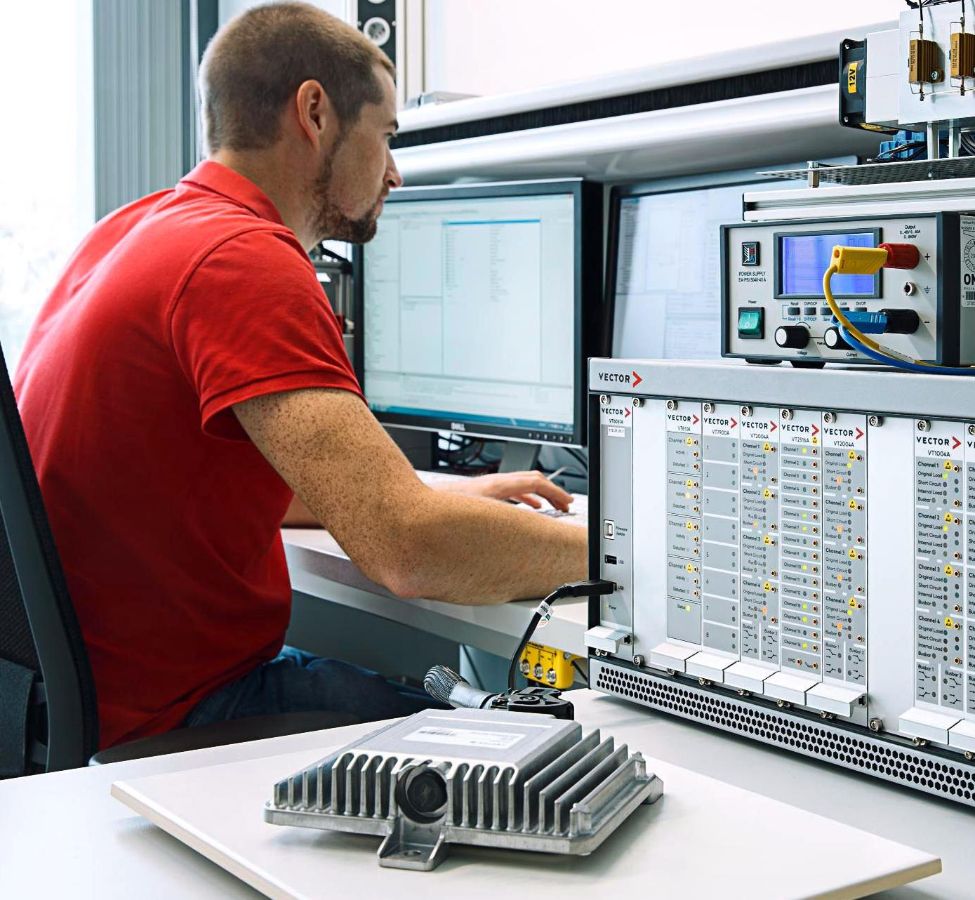
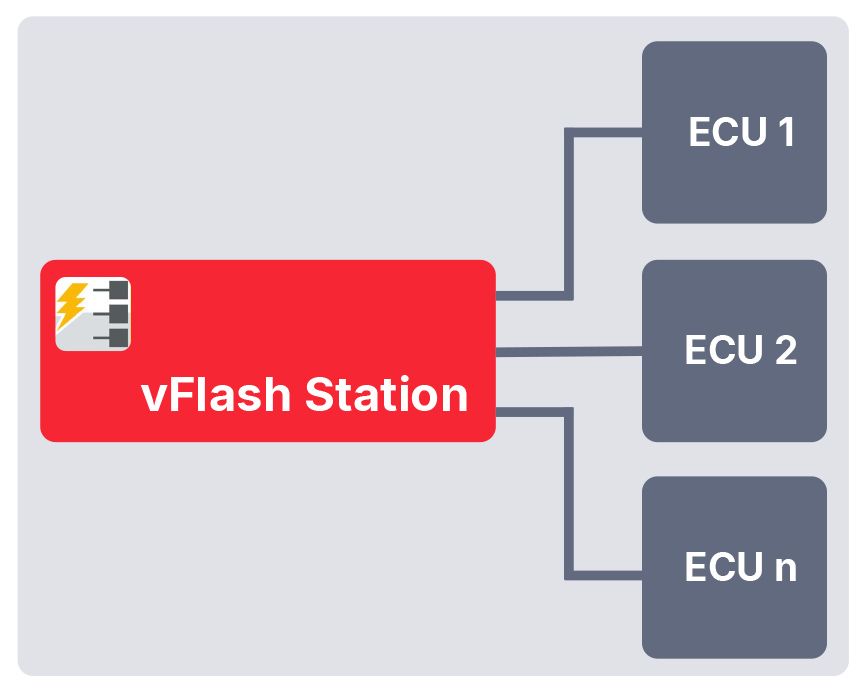
vFlash can be controlled via a graphical user interface or it can be simply integrated as a library in an existing environment. With the special edition “vFlash Station” you may simultaneously flash up to 10 ECUs each on a separate communication channel.
With the Variants and Editions, vFlash is perfectly suitable for all application areas where an ECU software update is required. vFlash is heavily used by OEMs and suppliers, in development, in testing and validation scenarios e.g. with CANoe and CANoe.DiVa, on test benches, in CI/CT pipelines with connected HIL systems, in production preparation, in production and scenarios close to production, on test drives and workshops.
vFlash Bootloader Support:
Vector offers prepared vFlash Templates for a large number of different automotive OEMs and bootloaders.
Key Features
Integrated Flashing, and ECU Update Platform
- Interactive flashing via the user interface (Desktop Editions) and automated flashing via a programming interface (Test Bench Editions – with C API and C# API) for process integration and integration into an existing software environment.
- Flexible referencing of flashware during the development phase for quick testing of code changes or easy replacement of preconfigured flash projects in a single package, also protected against unwanted changes.
- Software update using “native” data in Intel Hex, Motorola S, and binary formats or, alternatively, based on container formats such as ODX-F and manufacturer-specific formats.
- vFlash Standard Variant for updating ECUs via a single channel – also for consistent updating of multiple ECUs with vFlash Desktop Edition and the “System Update” feature.
- vFlash Station Variant for parallel flashing of up to 10 ECUs via their own channel – can be used directly for just-in-time updates via the GUI (vFlash Station Desktop Edition) or integrated via an automation interface (vFlash Station Test Bench Edition), for example in a production application.
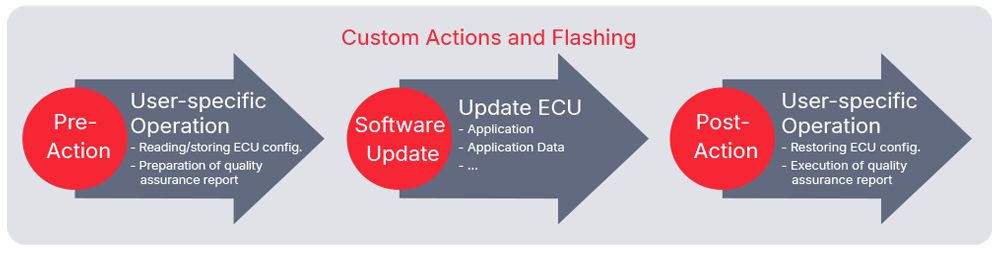
- Flexible extension of OEM flash sequences through so-called “Custom Actions” that are executed before and/or after flashing.
Extended ECU Flashing with Customization and Security
- Encoding or data backup with data recovery using Custom Actions.
- Documentation and quality assurance of flash actions in flash reports using Custom Actions or the built-in short report.
- Flashing of compressed and encrypted data.
- Validation of the flash bootloader in the ECU in combination with CANoe.DiVa (via CAN, FlexRay, DoIP, LIN) – for CAN (FD) and Ethernet also in a virtual environment using the “SIL Kit.”
- Use of vFlash in the context of HIL testing – CANoe uses vFlash, for example, to load test software onto the SUT in order to then perform specific tests.
- Authentication based on the “Security Manager” Add-Ons from OEMs and suppliers.
- Tracing of CAN(FD) and Ethernet communication for more detailed analysis in the event of a fault.
- Network management: Cyclical and event-based sending of static CAN (FD) messages
- Securing DoIP communication using TLS (ISO13400-3), even via a Windows-managed Ethernet adapter.
- Ethernet functions: IPv4 and IPv6 via 100/1000BASE-T1, 100/1000BASE-TX, 10BASE-T1s; support for VLAN, DHCP, and SLACK; waking up ECUs – via the DoIP Activation Line or via Open Alliance TC10.
Cases Studies
.webp "B2022NR00003_medium(c).jpg")
vFlash Station to Avoid Software Rework in Production at Volkswagen
Flexible and OEM-adapted Automated Programming Process at Valeo
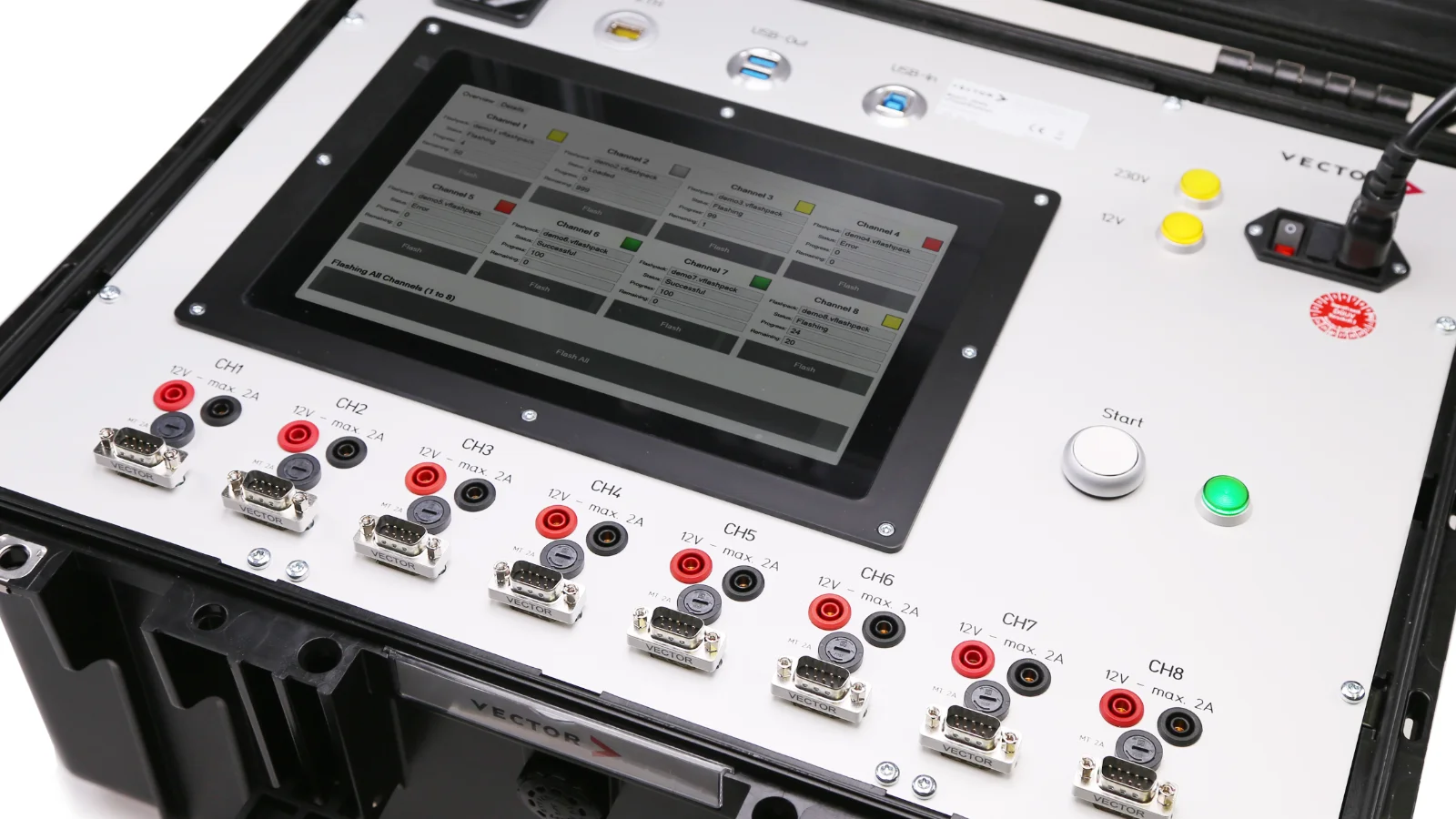
Portable Flash Station - Mobile solution for software updates for a large number of ECUs
Videos
Images
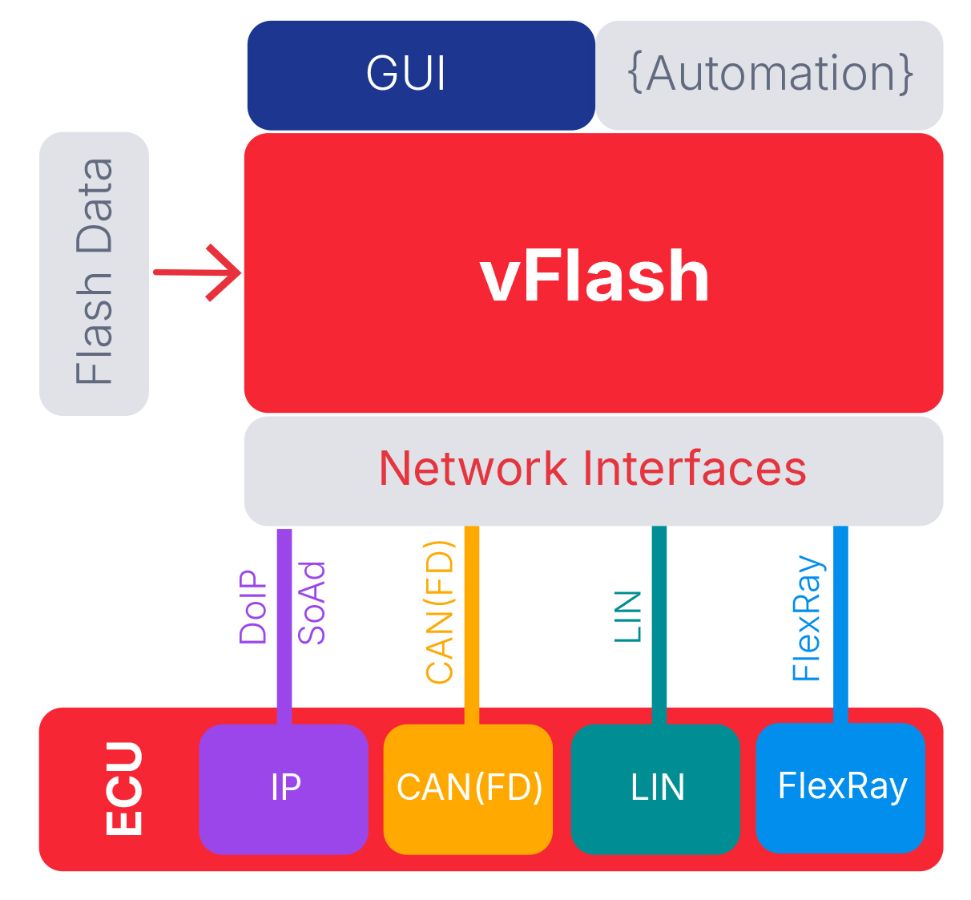
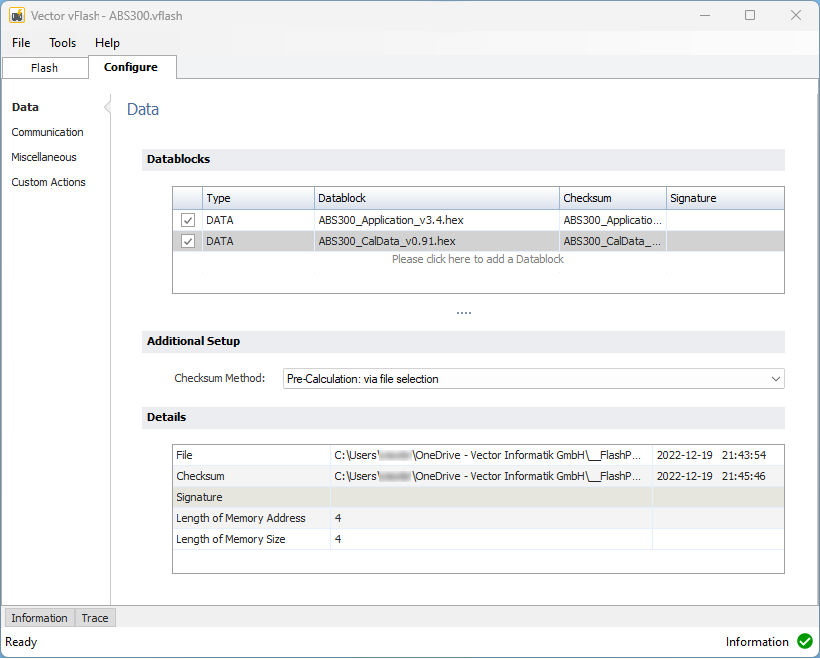
Variants and Editions
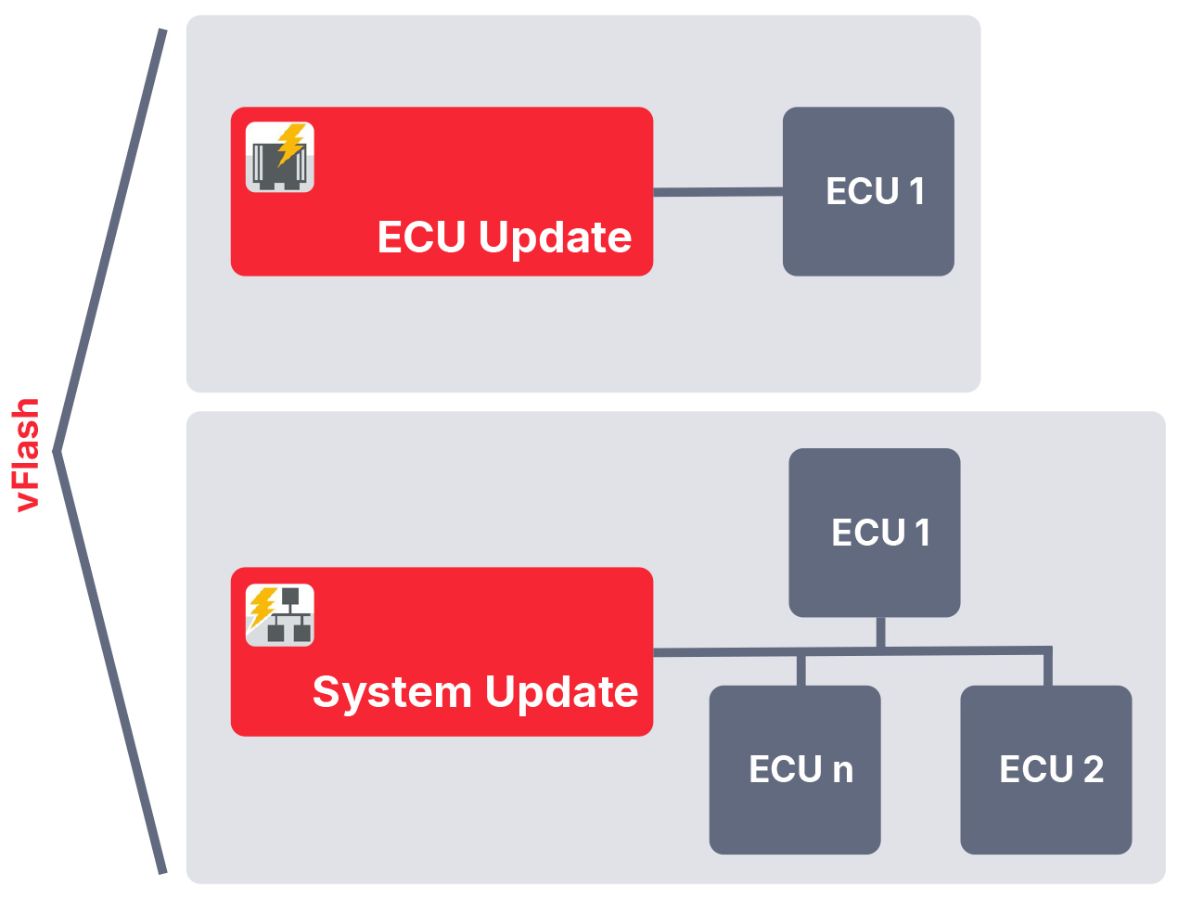
vFlash is available in two different variants: vFlash Standard (vFlash Standard, also just named vFlash) and vFlash Station. Each of these variants is available as Desktop Edition (DE) and Test Bench Edition (TBE).
The Desktop Editions focus on the interactive usage, whereas the Test Bench Editions focus on the automated usage.
vFlash (Standard)
vFlash enables the update of individual ECUs and can be used both via a graphical user interface and an automation API. It is also used to create update configurations for individual ECUs.
With vFlash, a flash process can be analyzed and potential optimizations identified. vFlash is generally used in development, on test benches, and in CI/CT pipelines but also in single channel updates in application areas close to production.
By simply exchanging the vFlash packages, switching between ECUs of different series on the same test/flash system is possible without significant setup times.
Using vFlash System Update software updates of multiple dependent ECUs in a subsystem are possible. vFlash System Update is part of vFlash DE (Desktop Edition).
All ECUs are then connected via a single channel of a network – also through a switch or (vehicle) gateway.
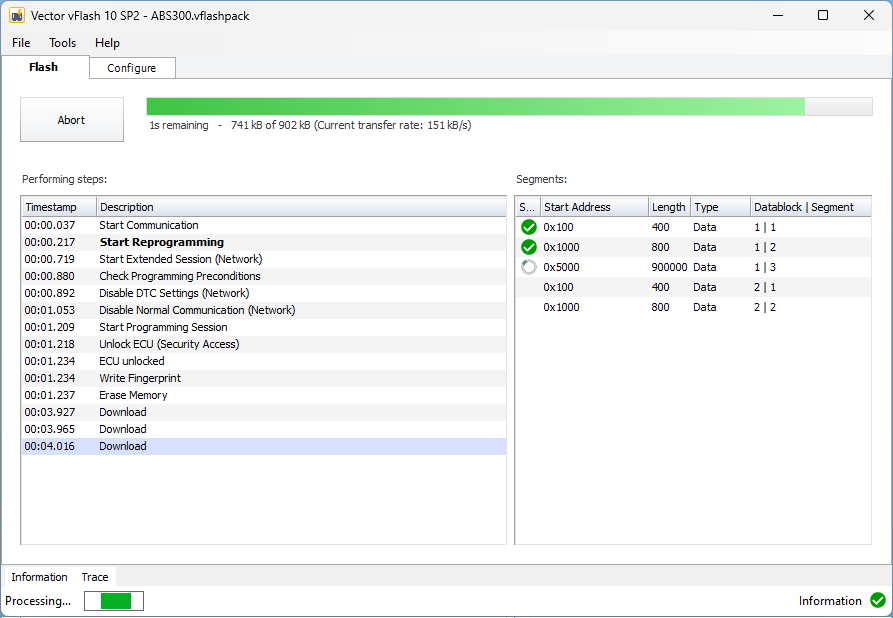
The update is operated interactively via the graphical user interface. The configured ECUs are displayed hierarchically in GUI. As soon as the update process starts, the progress of the update can be monitored in the system view.
vFlash Station
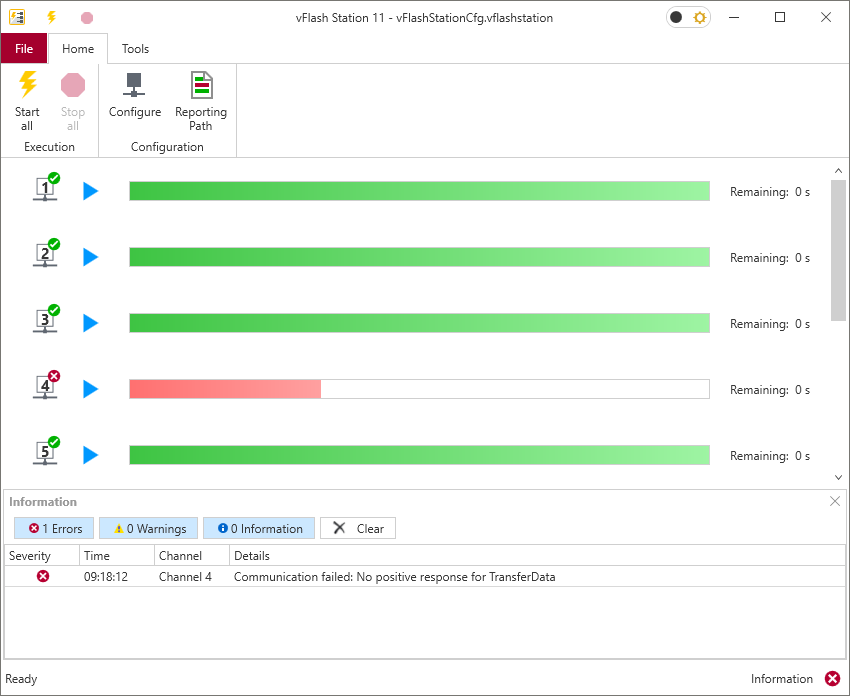
With the vFlash Station variant up to 10 ECUs may be updated in parallel, each on a separate network or channel. This makes it the ideal variant when maximum throughput is required, such as when a large number of ECUs need to be updated in the shortest possible time – for example in production-related scenarios at suppliers or OEMs.
The vFlash Station offers two flexible usage options: it can be operated interactively via the graphical user interface (vFlash Station DE) or seamlessly integrated as a library into existing production and test bench environments using the automation interface (vFlash Station TBE). With vFlash Station DE, users can efficiently update multiple ECUs through the GUI, enabling immediate, just-in-time software updates for a large volume of ECUs with minimal setup and no additional development or integration effort.
Alternatively, vFlash Station TBE allows for straightforward integration into customer-specific production or test bench software via the automation interface. In this scenario, logistics and testing remain under the control of the customer’s software, while the actual software update process is handled by the vFlash Station. This delegation ensures that the production line setup remains independent of the specific ECUs being targeted – for example, switching between different OEMs does not require any changes to the flashing setup or control software; only the relevant vFlash package needs to be exchanged.
In addition, the ability to create flash reports or address label printers ensures a high level of traceability and process reliability.
Highlights Version 12
Seamless Integration into Automated Toolchains
- A new Python API makes it easier than ever to integrate vFlash into user applications, CI/CD pipelines and automated toolchains.
- User applications can now control vFlash on the Vector VN8900 and VT6000 hardware platforms via the new SOVD API – opening the door to more flexible, service-oriented workflows and future-ready diagnostic environments.
Parallel System Updates with Less Complexity
- For system-level update scenarios, vFlash System Update now supports parallel and synchronized updates of multiple ECUs in a subsystem or vehicle via a single connection. This makes coordinated and consistent updates more efficient.
Broader OEM and Supplier Coverage
- vFlash 12 extends the support for OEMs and Tier-1 suppliers. vFlash now also supports Bosch’s proprietary interpretation of HEX flashware formats containing multiple datablocks and multiple segments, efficiently and conveniently controlled through a single Memory Description File.
- With support for more than 100 OEMs and over 250 OEM and Tier-1 bootloaders, vFlash 12 provides a powerful foundation for standardized, reliable, and future-ready ECU update processes.
- Support of the JLR ODX-F Flashware file format (ODX-F files that reference JLR VBF files)
More Transparency in Pre-Production Flashing
- The vFlash Station GUI has also been enhanced with a new user interface for getting more detailed information about the currently active just-in-time parallel ECU software update, each operated on a separate connection. This is especially valuable in pre-production environments where throughput optimization, time savings and cost efficiency are key success factors. The solution can be used interactively and can also be integrated into an existing production application.
Earlier Updates for MICROSAR IO ECUs
- vFlash 12 also simplifies software updates for lightweight MICROSAR IO ECUs. These ECUs can now be updated even when the companion ECU is not yet available, enabling earlier validation.
Custom Actions
- Flexible extension of OEM flash sequences by so-called “Custom Actions”. These are VDS scripts (Vector Diagnostic Scripting Library) and can be executed before and/or after flashing.
- Documentation and quality assurance of flash actions in flash reports using Custom Actions
- Coding or data backup with data recovery using Custom Actions
Custom Action Tutorial Videos
Supported Interfaces
Supported Network Interfaces and Interface Families
- Vector Devices: VN15xx, VN16xx, VN56xx, VN4610, VN5430, VN7572, VN76xx
- Non-Vector Devices: PassThru and D-PDU API devices on request
Supported HIL and Test Devices
Vector Tool Platform
| Starting with | 3.0 | 7.3 |
| vFlash 7 | x | x |
| vFlash 11 | - | x |
VN8900
| Starting with | VN8911 | VN8914 | VN8917 |
| vFlash 7 | x | x | x |
| vFlash 9 SP3 | x* | x* | x |
*After updating to Windows 10
VT6000
| Starting with | VT6011 | VT6051A | VT620 | VT6060 |
| vFlash 7 | x | x | x | x |
| vFlash 9 SP3 | - | - | x | x |
Services / Downloads