
Vector Application Framework
Vector Application Framework is a software framework that accelerates development of distributed applications for HPCs by abstracting middleware complexity and enabling an API-centric or workflow-driven way of working.
It is designed for application developers and software engineers who want to design, implement, integrate and test applications and be able to iterate quickly. Furthermore, it is a good fit for students and researchers who want a guided entry into application development and evaluation workflows.
Vector Application Framework in Practice
The Vector Application Framework is your key to straightforward application development for microprocessor-based Automotive ECUs. It is designed for efficiency, allowing you to set up, build, and run a new application within minutes. Avoid spending time on boilerplate code and put the focus on the business logic. Vendor lock-in is avoided by an open source business model.
Typical Workflow
Define your application interfaces in an API-centric approach and keep configuration in text files (“configuration as code”).
Generate and structure modules for collaboration and reuse across teams.
Integrate faster by relying on the framework’s middleware abstraction and integration scaffolding.
Test early with integrated unit test support and a SIL test setup.
Iterate quickly: from prototype to integrated application without redoing the basics.
Before / After
Before:
manual setup, repeated integration work, and high entry cost for new team members.After:
modular, collaboration-friendly workflows with a repeatable, text-based experience and reduced integration overhead.
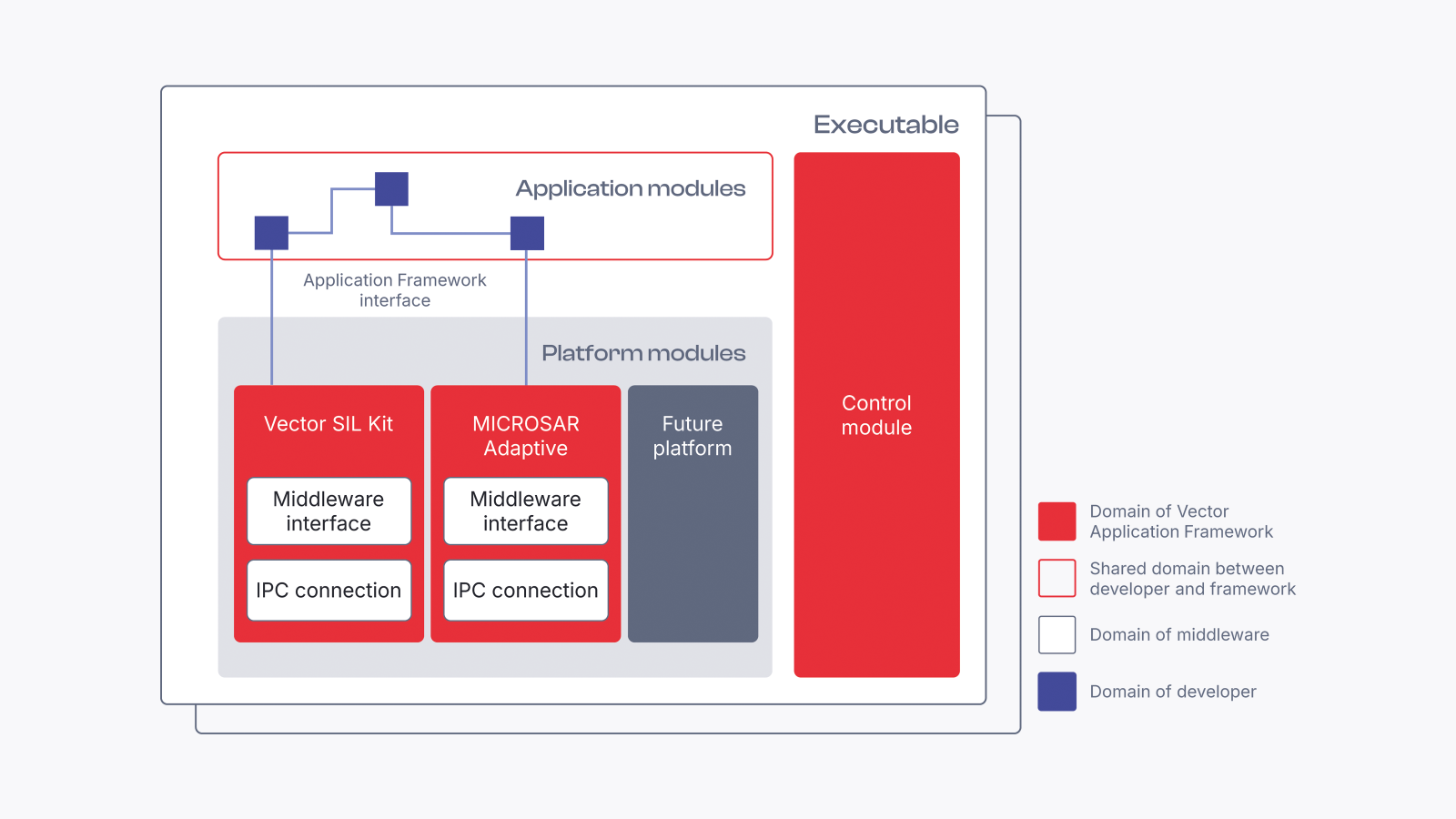
Key Benefits at a Glance
You want to ship application functionality faster—without spending cycles on stack complexity and recurring integration tasks. These highlights show what changes in day-to-day engineering.
- Rapid prototyping in minutes – Create new applications from scratch in about 15 minutes for fast experiments and learning loops.
- Shorter integration cycles – Reduce integration time from weeks or days down to 60 minutes or less (depending on project context).
- Less stack friction – Work productively through middleware abstraction and focus on application logic.
- Earlier feedback from tests – Use integrated unit tests and SIL tests to validate changes sooner.
- Team-ready modularity – Reuse modules, split responsibilities, and support collaboration-friendly development.
Use Cases

Key Features for Technical Evaluation
Vector Application Framework combines an API-centric development style with automation-friendly, text-based workflows. The features below are grouped together to help you quickly evaluate their suitability and impact on integration.
Api-Centric and Workflow-Driven Work Modes
What you do: Choose the working style that fits your team—from API-first design to guided workflows.
Why it matters: It standardizes collaboration patterns and improves onboarding and reuse.
Completely Text-Based User Experience
What you do: Keep configuration and project setup in text, enabling review, versioning, and automation.
Why it matters: Works well with modern toolchains and CI workflows.
Modular Development for Reuse
What you do: Structure applications into reusable modules.
Why it matters: Scales collaboration and enables consistent architecture patterns.
Middleware Abstraction
What you do: Build applications without handling middleware details in every step.
Why it matters: Supports independence and reduces recurring integration work.
SIL Test Setup
What you do: Validate behavior in software-in-the-loop environments.
Why it matters: Enables earlier system-level feedback before full target deployment.
Direct IDE Integration
What you do: Develop application code in your IDE with integrated workflows.
Why it matters: Reduces context switching and supports daily developer productivity.
Integrated Unit Test Setup
What you do: Run unit tests as part of your daily workflow.
Why it matters: Catches regressions early and supports fast iterations.
Open-Source Core in Eclipse.SDV
What you do: Build on an open-source foundation with an ecosystem-oriented approach.
Why it matters: Reduces vendor lock-in risk and supports interoperable workflows.
Mcp Support (Ready for AI Agents)
What you do: Use MCP support to prepare workflows for AI-agent-driven automation scenarios.
Why it matters: Sets up a path toward more automated engineering loops.
Dive Deeper Into Our Solution
Shifting Gears with SDV: Application Framework on YouTube
Conceptual walkthrough and context in a talk format.
Eclipse Automotive API Framework Project
Project context for the open-source ecosystem side.
Community Edition
Free of charge evaluation bundle of the product. Additional repository link provided for evaluation and reference.
Eclipse Project Repository
Source entry point.
Eclipse Project Documentation
Public documentation entry point.
More Insights
MICROSAR Adaptive
SIL Kit
Software Platform