TestValidationDiagnostics_dark_SystemVisual_RGB-hd_jpg.jpg

CANdelaStudio

Efficient Specifying of ECU Diagnostic Data

With CANdelaStudio, you take the lead in creating and refining formal ECU diagnostic specifications – intuitively, efficiently, and with precision. You define the foundation for robust diagnostic software, enable seamless automated conformity testing, and deliver reliable data to diagnostic testers across development, production, and service environments.

Designed for diagnostic specification engineers and developers, CANdelaStudio empowers you to turn complexity into structure and standards into action. You work faster, ensure consistency, and maintain full control over every detail of your diagnostic data.

At the same time standardized data exchange via ODX and AUTOSAR DEXT integrates your work effortlessly into modern toolchains and workflows. 

Advantages

Reusability

  • The user is guided by a templates concept. Despite differences in requirements, the diagnostic data is always described in a similar structure, even for different automotive OEMs. This enables reusability across projects.
  • Specific TIER1 support for OEM-independent diagnostic development

Consistent and Secure

  • Consistency checks during input assure high data quality.
  • Diagnostics-oriented user interface assure quick results.

Versatile Applicable

  • Import and export from/to different exchange formats (ODX, AUTOSAR DEXT/SYS-EX, CSV, RTF, HTML, A2L, XML, CDI, SOVD OpenAPI) simplify reuse and further use of data
  • Support of different protocols on different networks (UDS, OBDonUDS (SAE J1979-2), KWP2000, OBD2, WWH-OBD, SOVD, CAN, LIN, MOST, FlexRay, DoIP)
AUO_Image_c2.jpg
Case Study
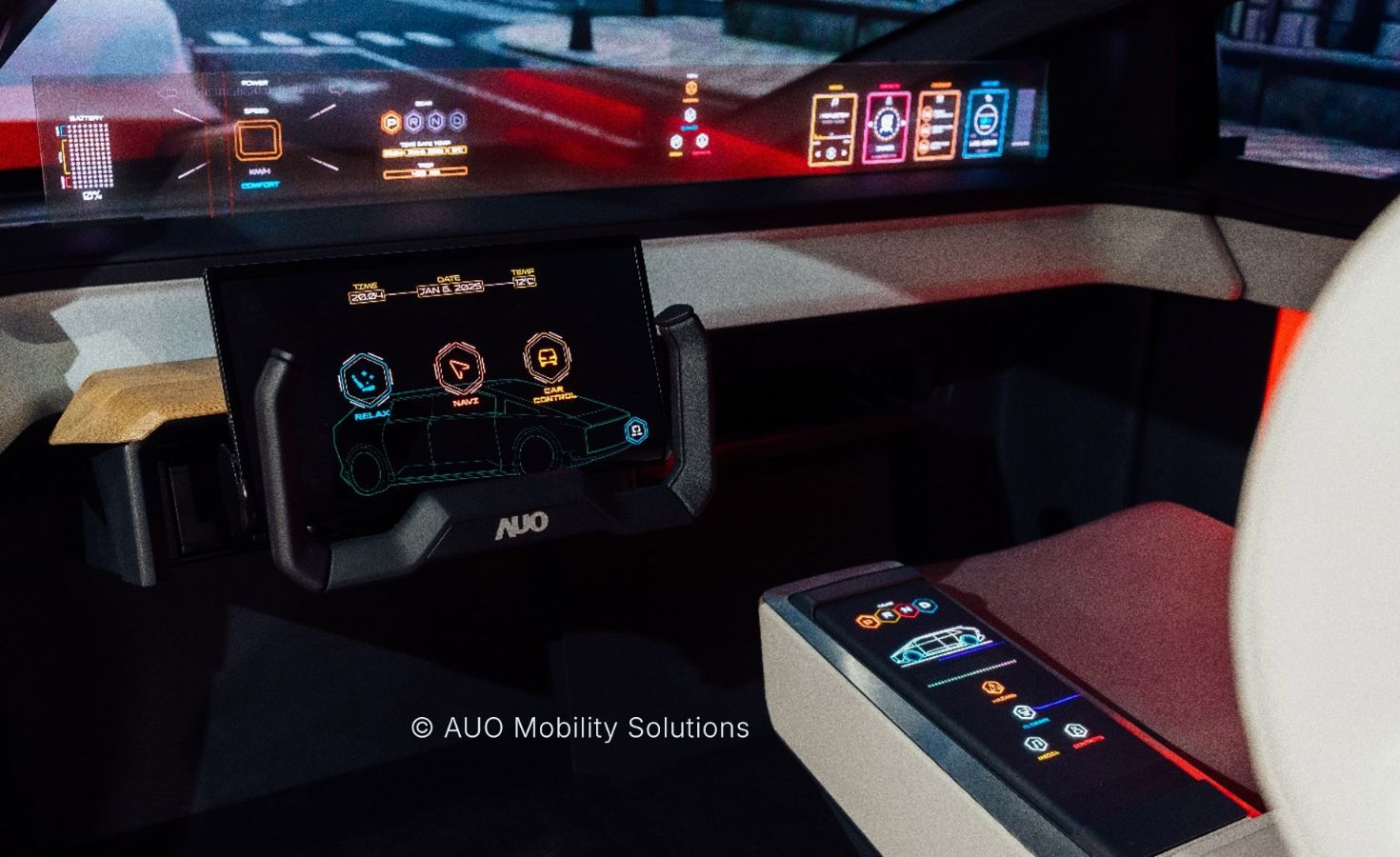
CANdelaStudio - Plugins for Automated Traceability of Diagnostic Requirements. Automated verification of requirement consistency between the CANdelaStudio diagnostic specification tool and the IBM® Requirement Management Tool DOORS® at AUO Mobility Solutions. The process improvement is based on the requirement plugins available in CANdelaStudio and two simple C scripts. The plugins enable the seamless capture of diagnostic-related requirements from the very beginning. They thus ensure full traceability between the requirement management tool and CANdelaStudio throughout the entire project lifecycle.

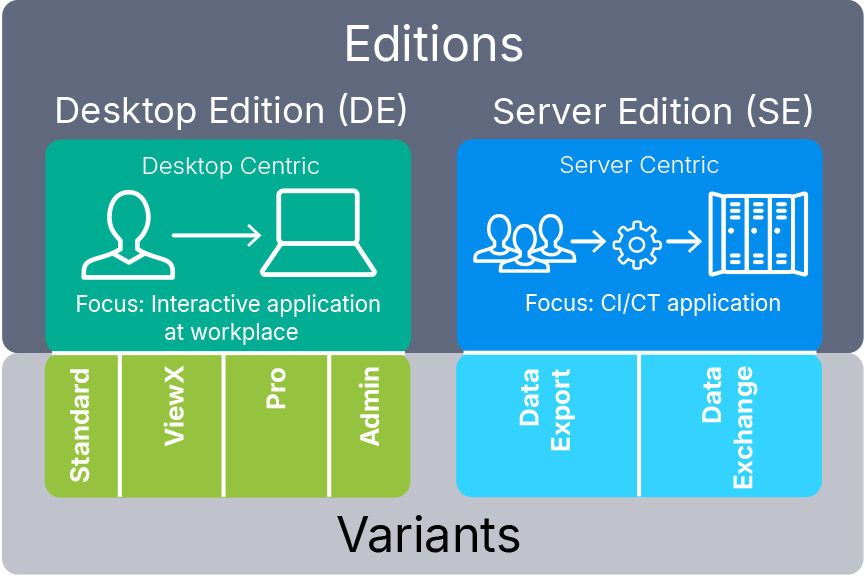
Application Areas: Editions & Variants

Editions are products tailored for defined purposes:

  • Desktop Edition (DE) for interactive work
  • Server Edition (SE) for automated CI/CT environments
    (for Windows and Linux)

Variants are staggered feature sets of an Edition:

  • Variants for the Desktop Edition (DE): Standard ViewX Pro Admin
  • Variants for the Server Edition (SE): Data Export | Data Exchange
CANdelaStudio_Editions_Variants_new_CI.jpg

Variants for Desktop Edition (DE):

CANdelaStudio Standard

CANdelaStudio Standard offers all important functions to conveniently describe ECU diagnostics (e.g. ECU identification, fault memory, session, security, ...).

Functions of CANdelaStudio Standard:

  • Creating and editing CANdela documents (*.cdd) using CANdela templates (*.cddt)
  • Setting attribute values for code generation, for example
  • Comparing two CANdela documents, or parts of CANdela documents
  • Importing data from various standard formats (ODX, CSV, …)
  • Exporting the CANdela document to various data formats
  • Viewing and consistent editing in one language

Target group: All active participants in the diagnostic process should use CANdelaStudio Standard.

CANdelaStudio ViewX

The well-priced CANdelaStudio ViewX provides viewing, comparing and exporting of diagnostic data, but no editing.

  • It has the same functionality as the variant CANdelaStudio View, which is delivered with the Vector tools (CANoe, CANape...) and can additionally export the diagnostic specification as a requirement specification (RTF, HTML).
  • Additionally, it features data oriented exports (ODX, CVS…), a compare view and an ODX Viewer.

Target group: Authors of test sequences and users of test systems.

CANdelaStudio Pro

Like CANdelaStudio Standard, but additionally with manual and semi-automatic translation of the diagnostic specification into multiple languages (in the variant CANdelaStudio Standard, you consistently edit the diagnostic specification in one language only).

Furthermore, you can create and use dictionaries following the open TMX standard. Besides Western European languages, Far Eastern languages like Japanese are supported.

Target group: International projects and projects where multilingual specifications are required or helpful.

CANdelaStudio Admin

Like CANdelaStudio Pro, but with additional editing of diagnostic templates (*.cddt) for the definition of:

  • Fundamental Protocol Services
  • Fault Memory (structure and properties of individual diagnostic trouble codes)
  • Diagnostic Classes for different diagnostic use-cases
  • Specifying authorization settings for objects
  • Modifying objects without restriction by authorization settings
  • Attributes for configuring diagnostic tools (tester, code generator, validation…)
  • Delete individual revision entries

Furthermore, you can edit template aspects in CANdela documents (*.cdd) and translate templates (*.cddt).

Target group: Users who are responsible for the global diagnostic concept of a group of ECUs or vehicle model series.

Variants for Server Edition (SE):

With the CANdelaStudio Server Editions (SE), you execute CANdelaStudio imports/exports in a server environment, e.g. Continuous Integration/Continuous Design Build Pipeline, Jenkins, Virtual Machine, Docker etc.

CANdelaStudio Server Editions include a command line oriented interface and are offered as two Product Variants - also
for the operating system Linux:

  • Data Export Server Edition: Exports only
  • Data Exchange Server Edition: Import/export

CANdelaStudio Server Edition in a CI/CD Pipeline

The video on the right, and the webinar recording presents an approach to automate diagnostic development tasks using CANdelaStudio Server Edition (SE), reducing manual effort when updating diagnostic specifications such as CDD files.

The automation pipeline includes validation via UDS/AUTOSAR checks and automated export of ODX and DEXT files, with potential for more complex workflows involving testing and deployment.

Implementation requires a source control system, CI/CD platform, automation tools, and a server environment, with examples provided for GitHub Actions and Jenkins.

CANdelaStudio Server Edition - Automation Pipeline on a Development Process | #VectorTechTutorial

Key Features

In order to handle OEM-specific differences in a single tool, CANdelaStudio supports document templates (CDDT). A document template corresponds to an OEM-specific diagnostic specification in content. It contains a formal description of all allowable basic services of the ECU and the set of mandatory content that must be implemented for every ECU.

Document templates are provided by many automotive OEMs. For projects without a OEM-specific document template, a generic document template for UDS is included with delivery.

CANdelaStudio makes it easier for the supplier to adapt the software of an ECU developed in a previous project to the diagnostic specification of another OEM by offering the following benefits:

  • Mass data transfer
  • Adaptable AUTOSAR version
  • Save as different document versions
  • Hide supplier diagnostics
  • DEXT import

A diagnostic specification is created in one document for each ECU on the basis of the OEM-specific Template. It contains all diagnostic elements.

The benefits:

  • A consistency check makes your diagnostic workflow more efficient by ensuring data quality at an early stage
  • With the “Document Upgrade” function, you can easily transfer DIDs and Routines from one document to another
  • The Compare View shows changes between two versions and saves the results. Numerous filter, search and advanced navigation functions are available.
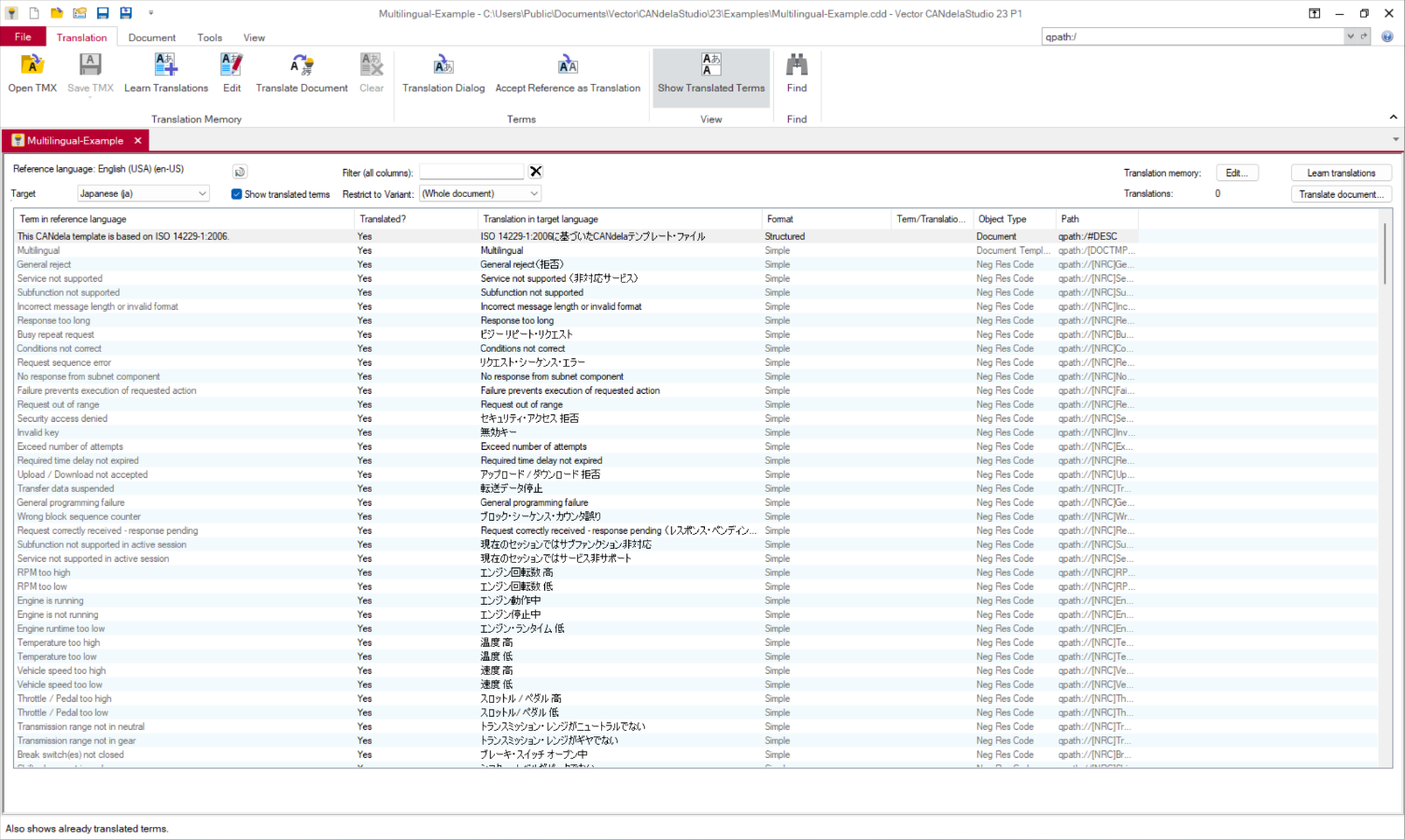
  • Multilingual CANdela documents, including translation view and TMX exchange, facilitate projects with foreign-language partners
  • Import and export of diagnostic trouble codes (DTCs) in a wide variety of formats
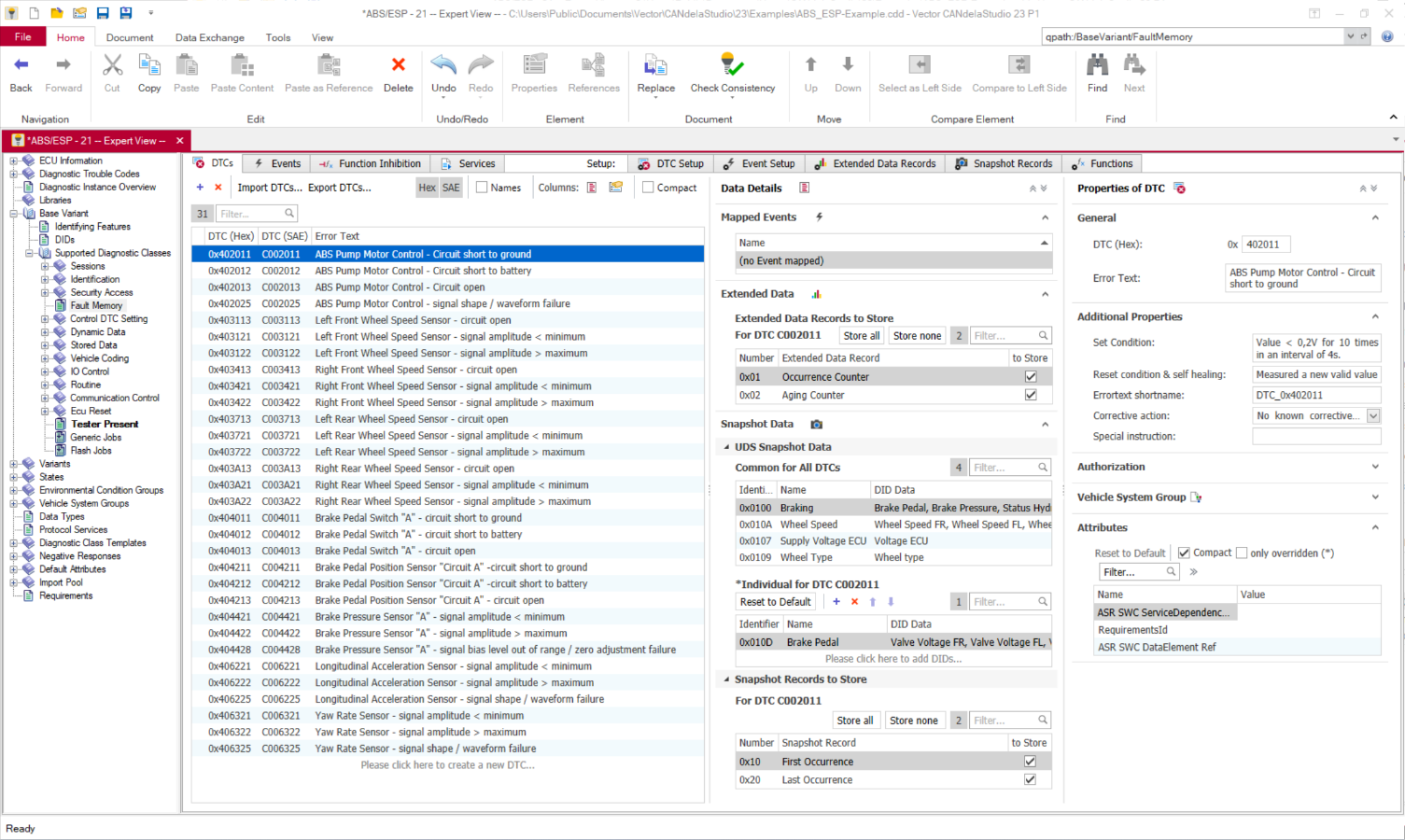
  • Different views of diagnostic trouble codes: From a table-based overview to a view of the validity of DTCs in different variants and a detailed editing view for an individual DTC.
  • Mass Data Transfer: For easy transfer of all diagnostic elements at once into one document based on a CDDT1 and into another document based on a different CDDT2

Videos

Images

CANdelaStudio 23P1 - FaultMemory.png
Fault memory processing: structured display of all DTC properties with all details in a cockpit view
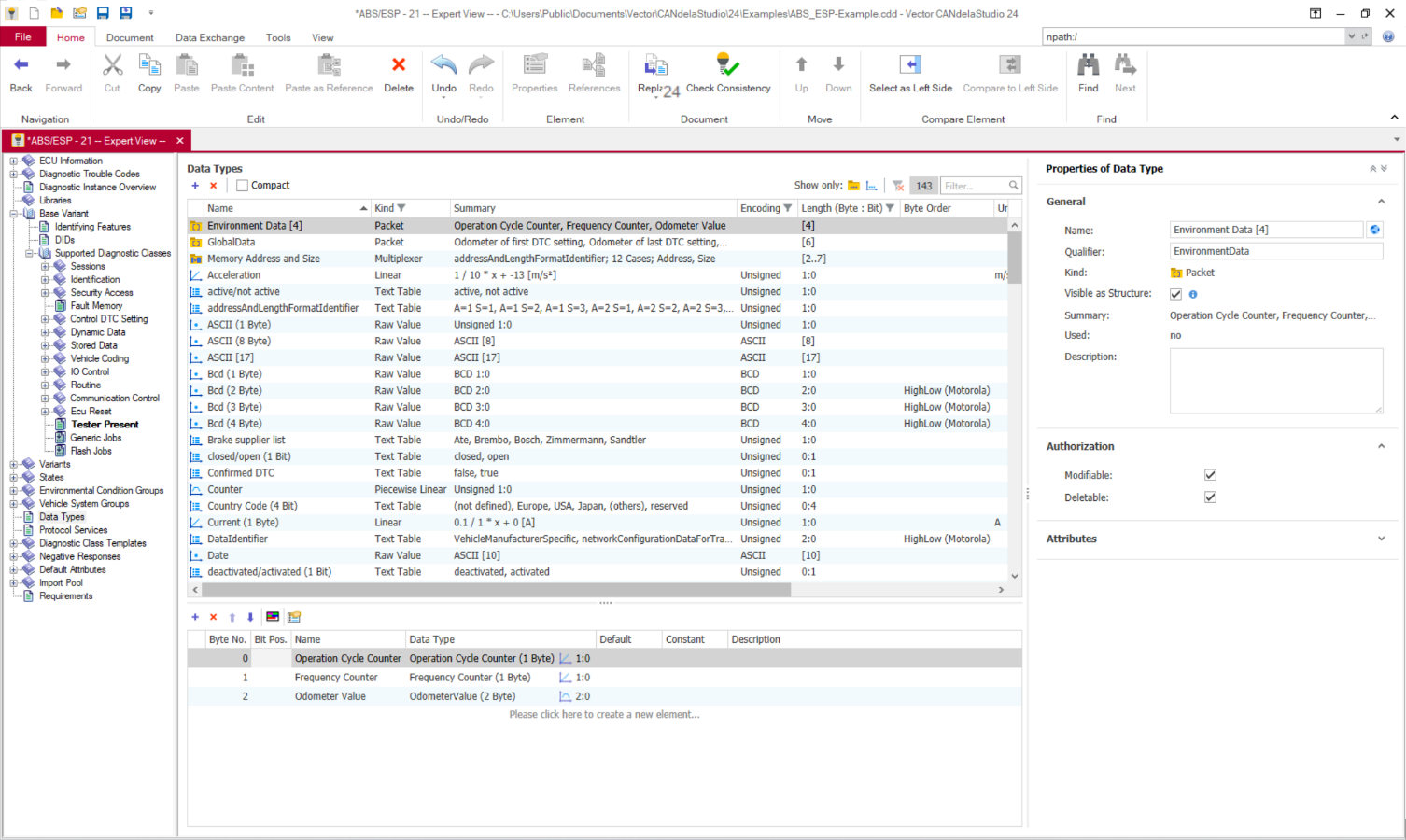
CANdelaStudio 24 - DataTypes-ComplexDataType.png
Data Type List: configurable columns, flexible filters based on individual properties, grouping of properties
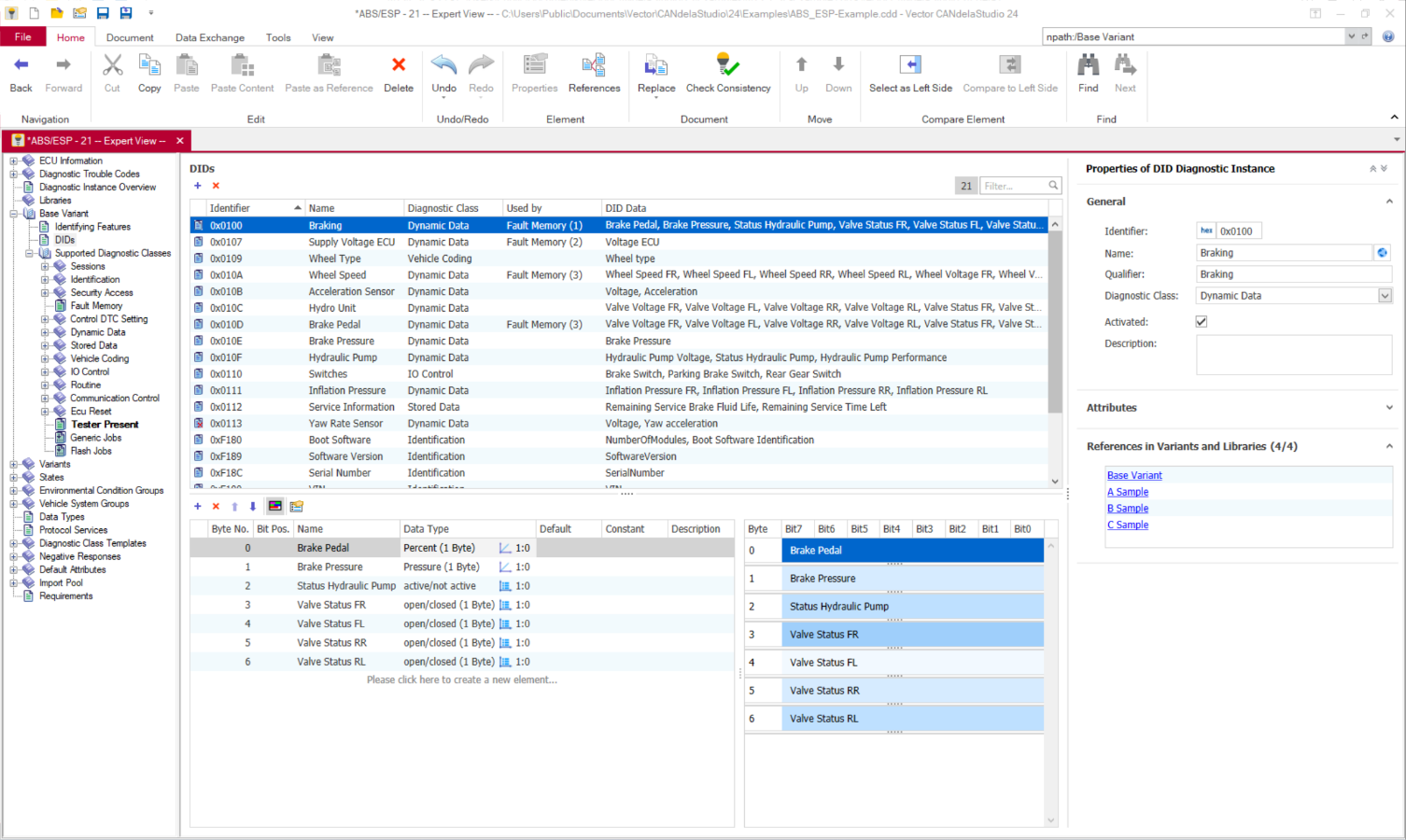
CANdelaStudio 24 - DIDsView.png
DID editing with graphical overview
CANdelaStudio 23P1 - MultilingualExample.png
Automated translation of recurring text modules in CANdelaStudio Pro
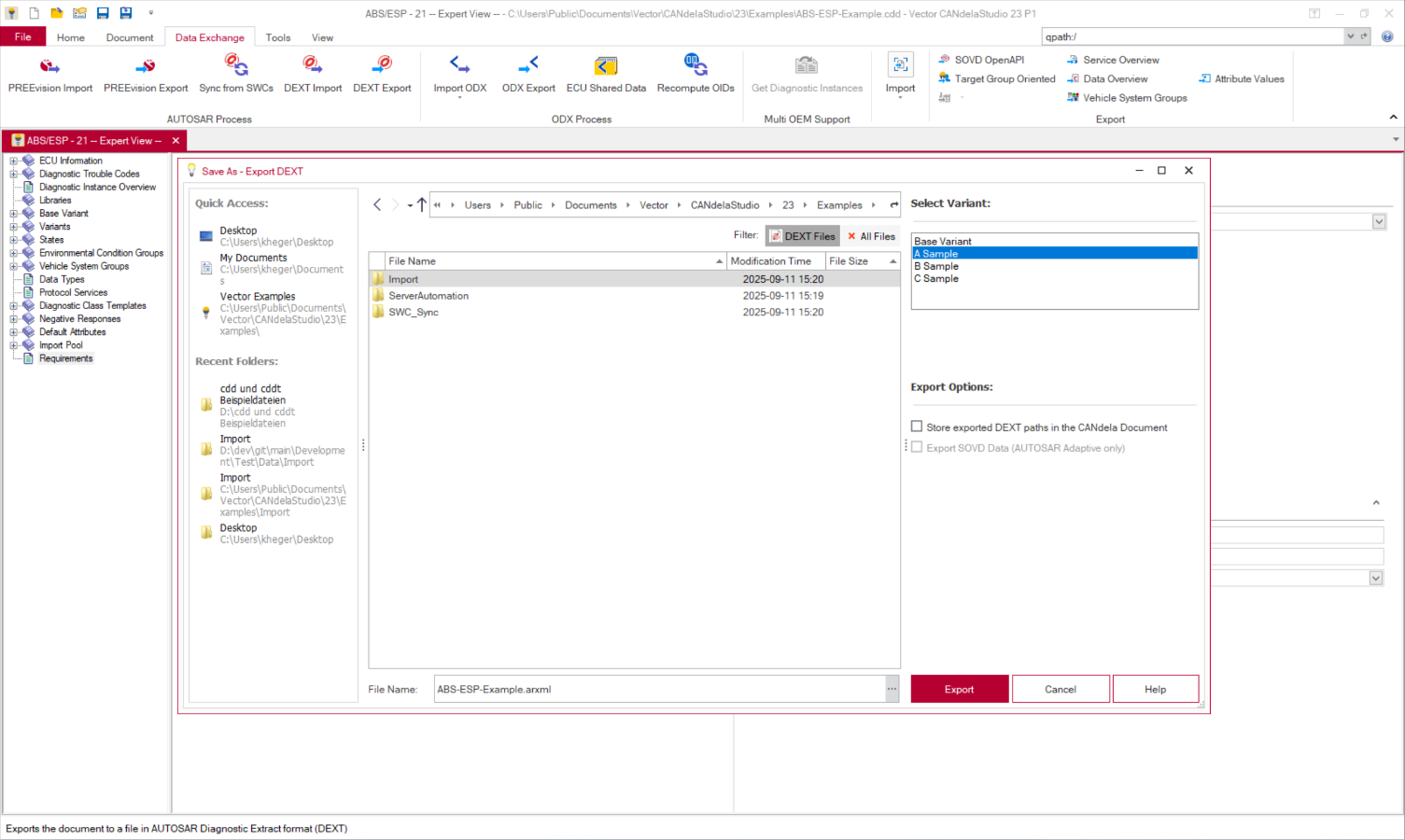
CANdelaStudio 23P1 - RequirementsView - DEXT Export.png
AUTOSAR process: import of requirements and export to an AUTOSAR Diagnostic Extract (DEXT format)
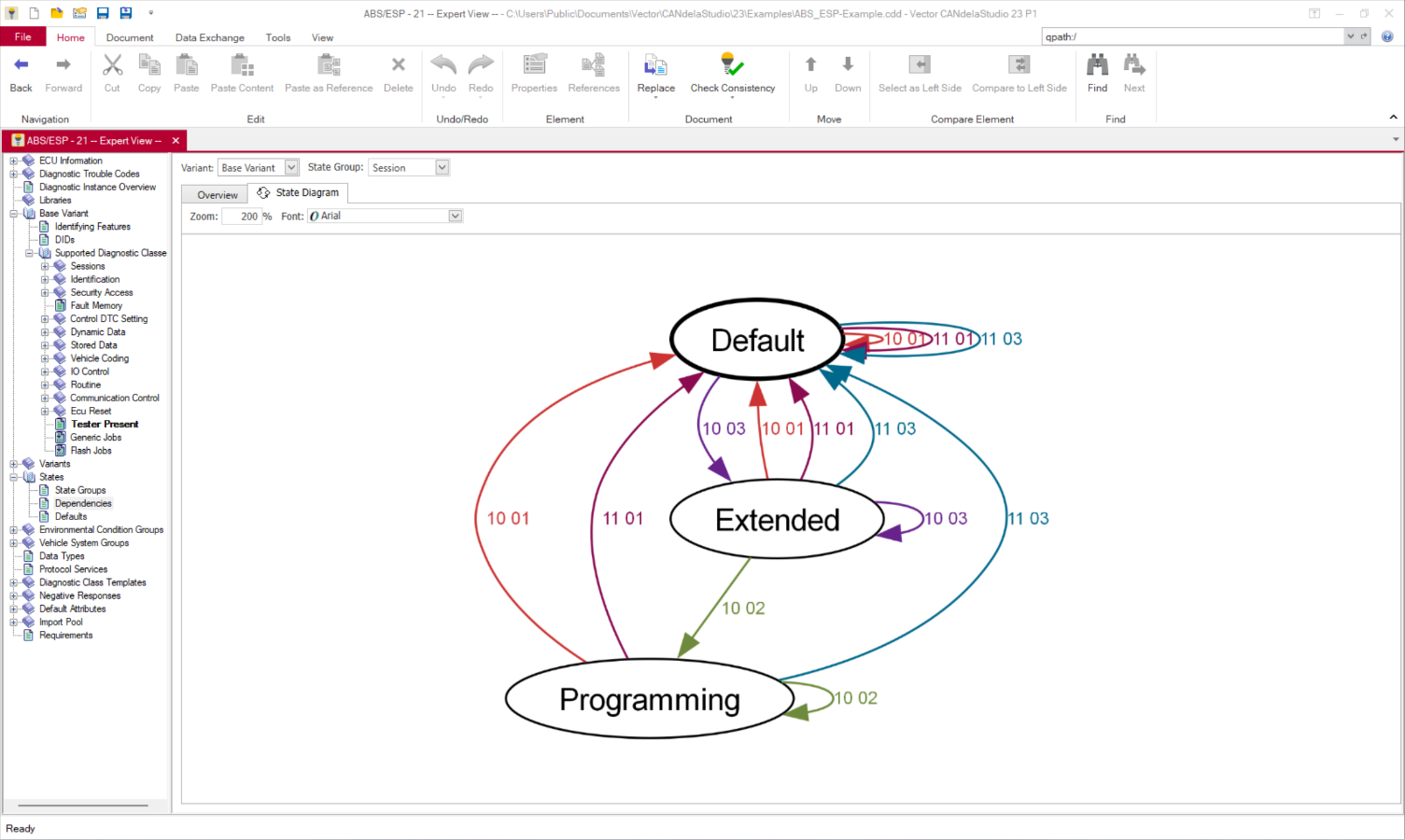
CANdelaStudio 23P1 - StateDiagram.png
Graphical visualization of state dependencies of diagnostic services
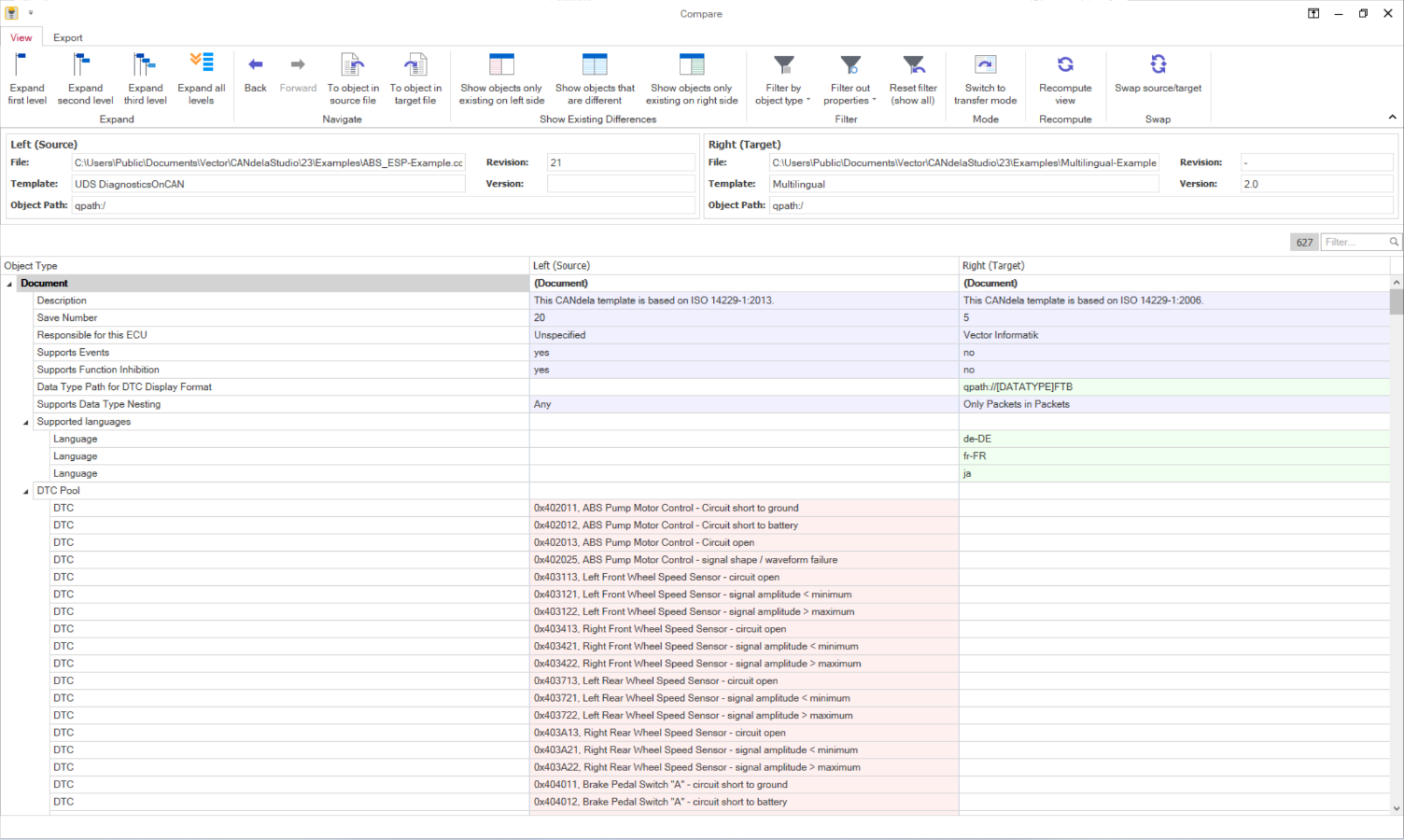
CANdelaStudio 23P1 - CompareView.png
Compare View of two diagnostic descriptions
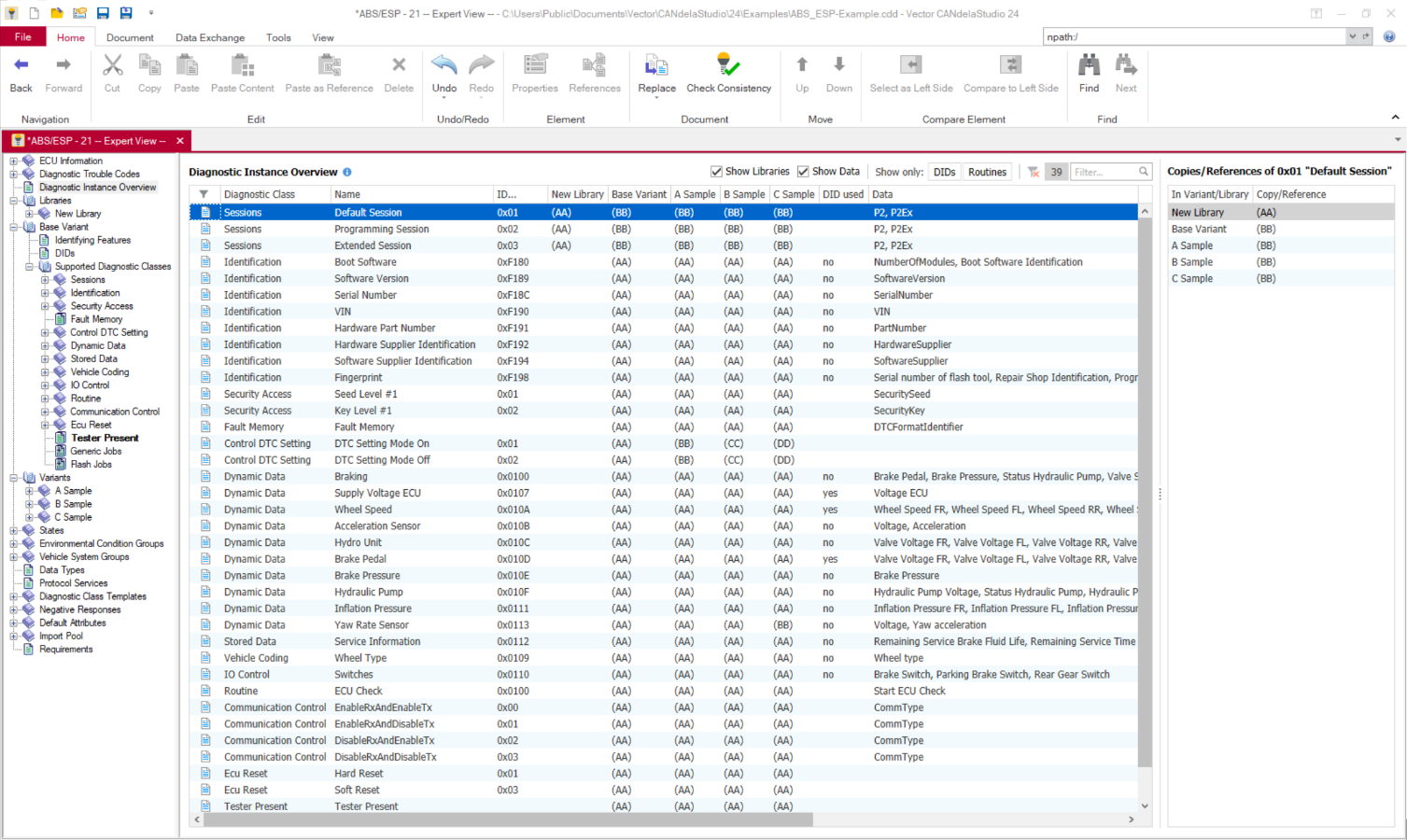
CANdelaStudio 24 - DiagInstanceOverview.png
Diagnostic Instance Overview
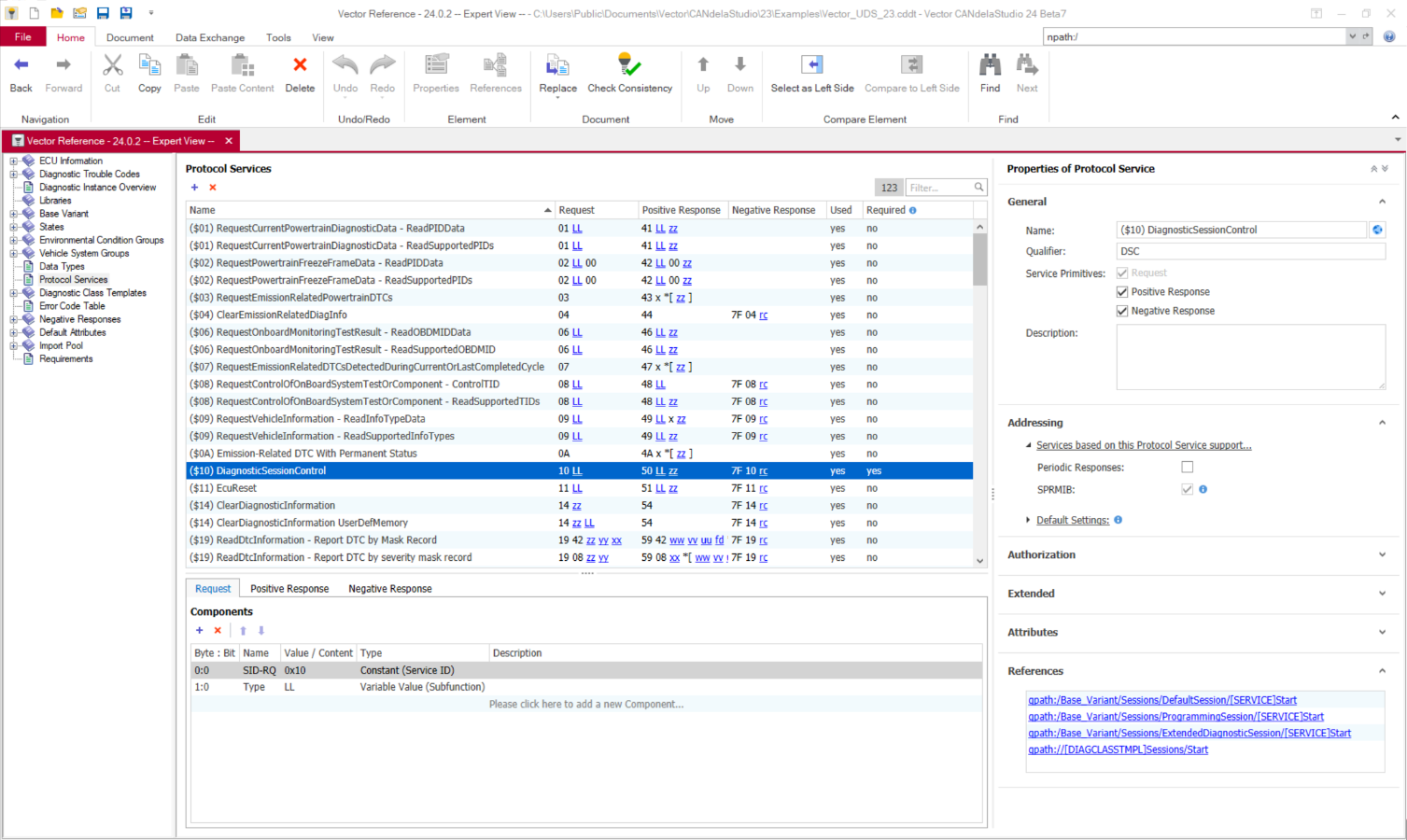
CANdelaStudio 24 - ProtocolServices.png
Protocol Services Overview

Highlights of Version 25

  • With the new AI features in CANdelaStudio 25, users can find information, work steps, and project-specific guidance much faster—without having to spend time searching through documentation or complex diagnostic data.
  • Smart Help provides precise, context-sensitive answers directly from the Help menu, making it easier to get started quickly and boosting daily efficiency.
  • Smart Suggestions provides well-founded recommendations based on project data, CDDs, and other artifacts, ensuring greater consistency, better data quality, and less rework.
  • Especially with complex diagnostic models, AI replaces time-consuming trial-and-error with targeted guidance, thereby significantly shortening development cycles. 
  • In Version 25, the AI functionality is available via the MCP approach, e.g., in Visual Studio Code, providing a sneak peek into AI-powered workflows around CANdelaStudio.
PREEvision_CANdelaStudio_DVC_DE_SE_Edition.png
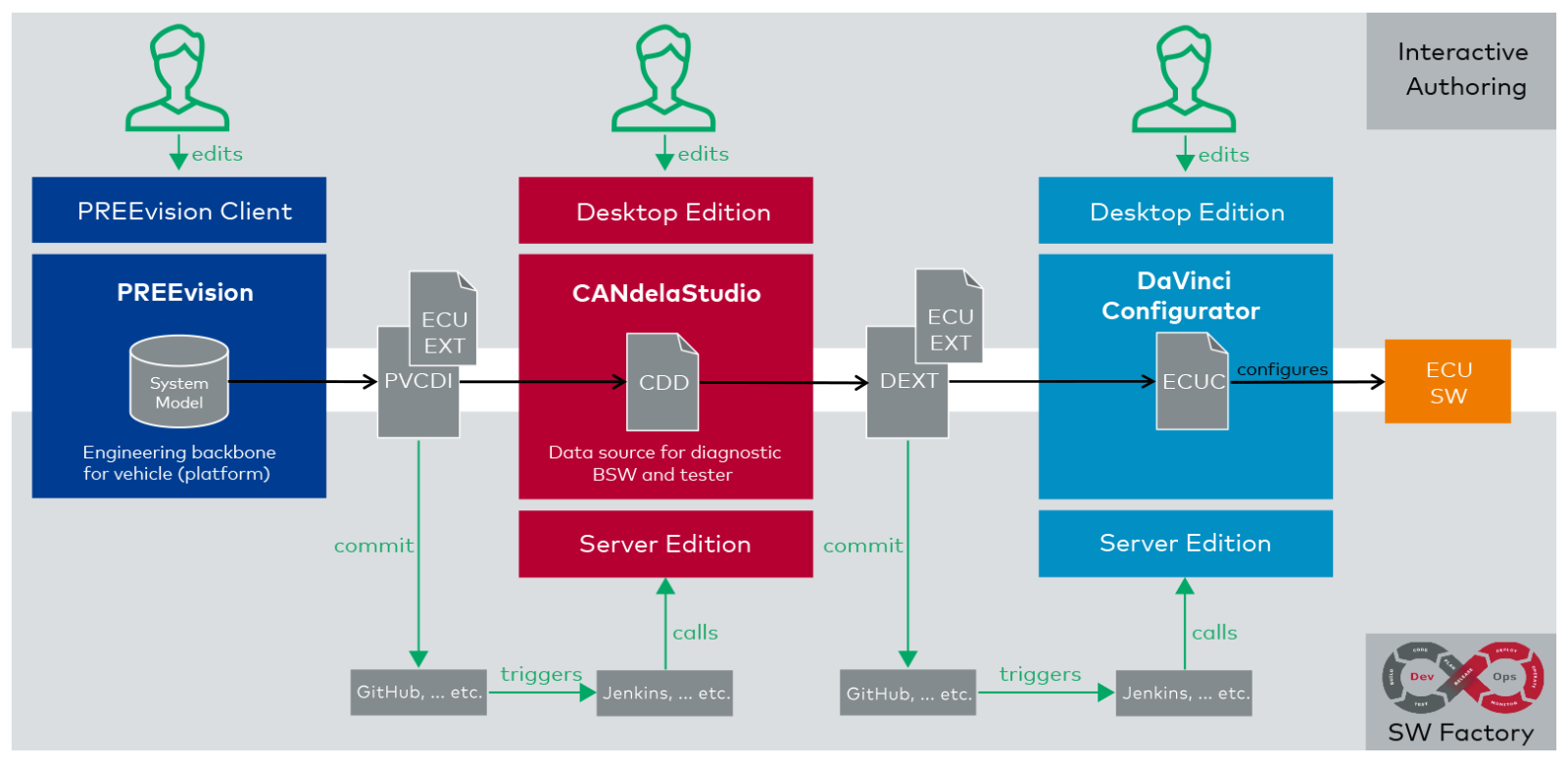
Interactive Authoring (Desktop Edition) | Software Factory/DevOps (Server Edition)
  • The Server Edition makes CANdelaStudio ready for automated CI/CD pipeline processes and saves valuable time, as recurring tasks no longer need to be performed manually. 
  • Companies benefit from improved quality and stability, as automated workflows reduce human error and provide faster feedback on issues. 
  • The numerous operations include import, export, plugin execution, modification of individual properties, and adjustment of many elements to predefined values. This allows the Server Edition to be flexibly integrated into existing development and data processes.
  • With Volume License and Agent License, scalable licensing models are available that offer a cost-effective solution for both predictable standard operations and high-load peaks.
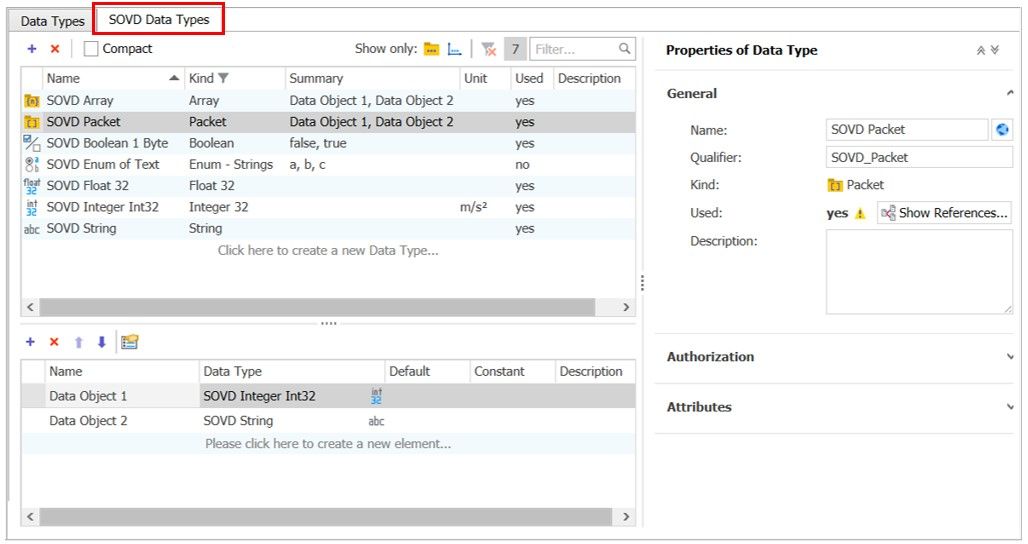
SOVD_Data_Types_V25.jpg
  • In the area of SOVD, CANdelaStudio 25 expands modeling capabilities with the new “Operation” class type. New properties such as “Proximity Proof Required” and optional data objects enable the application-specific mapping of SOVD-specific requirements. 
  • Version 25 introduces dedicated SOVD-specific data types, which are clearly managed in a separate tab. 
  • The result is clear data modeling and tailor-made support for SOVD-based projects. 
  • CANdelaStudio 25 improves process reliability with new, precisely tailored types for DTC properties: Event Operation Cycles, Event Conditions, Boolean, and non-translatable strings.
  • For SAE J1939-73, a DTC can have a separate SPN/FMI value in addition to the hex value for UDS. This improves integration with subsequent processes such as code generation and data exchange. 
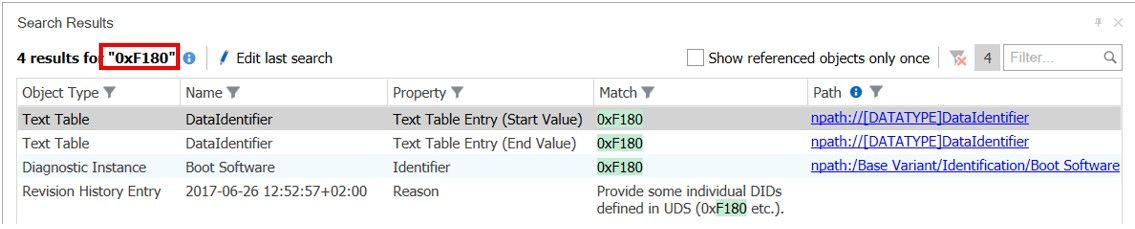
Search_V25.jpg
  • The redesigned search function in CANdelaStudio 25 delivers results faster, more comprehensively, and with significantly greater ease than before – a noticeable advantage for one of the most frequently used core features.
  • Users can now start searching directly from the search field or use the new search dialog with options such as case sensitivity, whole words, prefix, suffix, and search context. 
  • The result display is clearly structured, filterable, and allows for quick navigation via clickable object paths.
  • At the same time, the search now also covers content such as text tables, attributes, and other elements that were previously difficult to find, thereby significantly improving daily work on the project.


  • New lists and integrated property pages for job containers, jobs, job parameters, and the “Documentation Classes” provide greater transparency and faster access to relevant properties.
  • Particularly useful for expert users: the new overview list of default attributes, which allows attributes to be conveniently edited across objects and via multiple selection.
  • This reduces the number of clicks required, simplifies bulk adjustments, and helps users maintain data more efficiently and consistently.
  • The file dialog provides access to synced OneDrive folders, making it even easier to find and use files in modern work environments.

Import/Export Formats

SOVD

  • SOVD OpenAPI Export: Export of CDD files based on UDS to a SOVD OpenAPI file

AUTOSAR

  • Easy import of signals and conversions from an AUTOSAR System Description
  • Export of the AUTOSAR Diagnostic Extract (DEXT files)
  • Linking of diagnostic objects in CANdelaStudio with the
    associated objects in the AUTOSAR System Extract (SYS-EX)

Sync of Diagnostic and SW Components (SWCs)

  • Creation and updating of diagnostic objects from type lists or system extracts (SWCs from DaVinci Developer)
  • Updating of SWCs in DaVinci Developer via the DEXT format

CANdb and FIBEX

  • Adoption of signals and conversion into data objects and DTCs

ODX

  • Import from ODX (2.2, 2.0.1), as well as export to ODX (2.2, 2.1, 2.0.1)
  • Extensive optional settings in ODX export (e.g. table or service oriented)
  • Partial import of ODX data, e.g. only Layers and Services
  • ODXStudio View for viewing ODX data
  • Intelligent support of Object IDs (OID) and Text IDs (TID)

Reports

  • Diagnostic specification export (RTF, HTML)
  • Service overview export (CSV file)

Others

  • SAE J1979 and SAE J2012 Digital Annexes: Import of detailed OBD data into a selected variant or library

Data Exchange in AUTOSAR Development

Advantages & Benefits

  • Comprehensive integration into existing workflows (AUTOSAR) 
  • Simple exchange of diagnostics-relevant data between the tools involved 
  • Consistency between diagnostic data and descriptions of the software components.
  • Faster development cycles thanks to automated synchronization and merging in the event of changes.
  • High degree of automation in software configuration
  • Consistent DEXT and ODX data: Both are generated from the same source.
SWC-Sync_UseCase1_new_CI.jpg

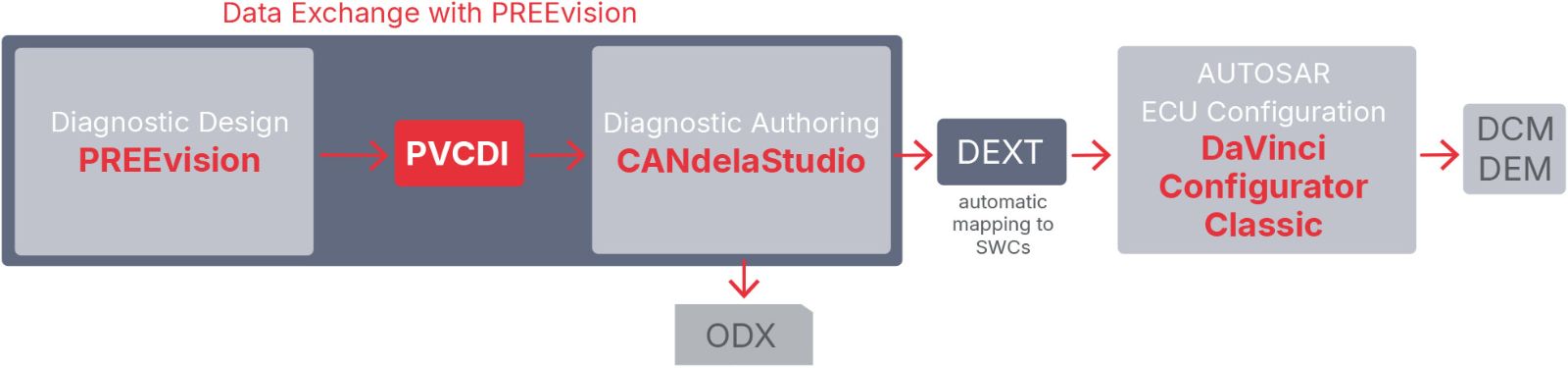
The E/E design tool PREEvision combines software and diagnostic design, making vehicle diagnostics an integral part of the E/E development process.

  • The diagnostic model can be exported directly from PREEvision to CANdelaStudio.
  • The diagnostic data is further refined and supplemented in CANdelaStudio.
  • Manual adaptation of the diagnostic data to the software is no longer necessary.
  • The data exchange between the two tools ensures that the internal and external view of diagnostics remains synchronized.

Services and fault memory with all details from the diagnostic reports are taken into account. The scope of the export of diagnostic data is based on the software-hardware mapping, i.e. the availability of diagnostic objects on a dedicated ECU.
SWC-Sync_UseCase_DaVinci_new_CI.jpg

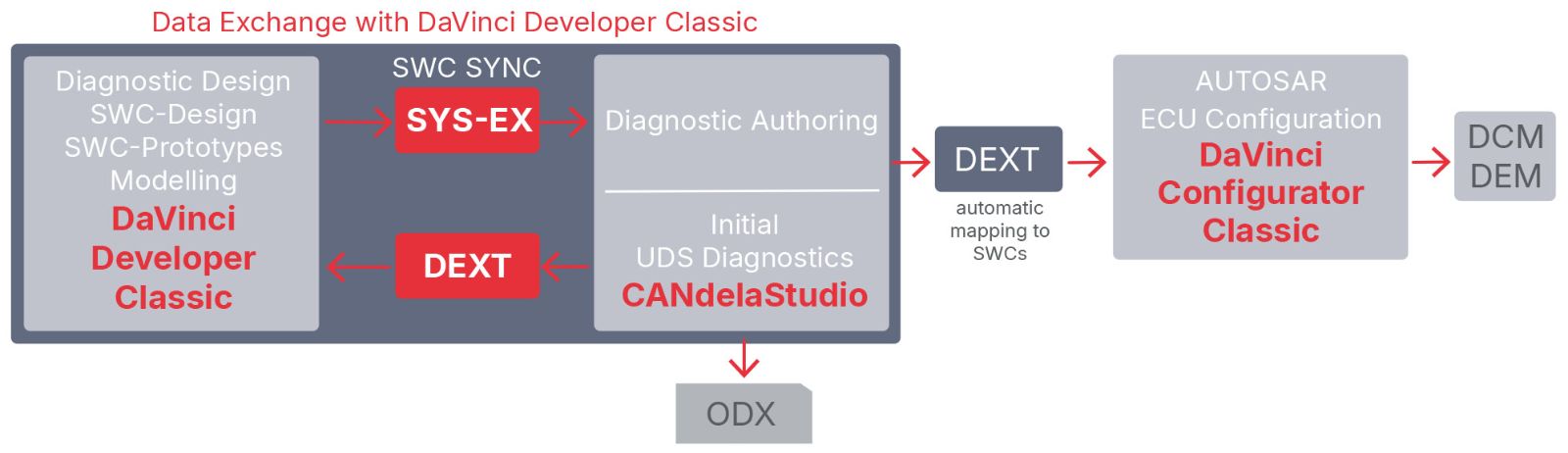
DaVinci Developer Classic is a tool for the architecture design of software components (SWCs) for AUTOSAR classic ECUs.

An AUTOSAR System Extract (SYS-EX) is an extract from a System Description that represents the description for an ECU. CANdelaStudio uses the AUTOSAR System Extract data from DaVinci Developer Classic as output data for the “SWC Sync” (Software Components Sync) function. This provides a quick and easy way to synchronize with the content of an AUTOSAR System Extract that is relevant for the implementation of UDS diagnostics.

The advantages:

  • A uni-directional sync of SWCs to the diagnostic specification in CANdelaStudio for further processing using diagnostic authoring (e.g. assignment of DID numbers and DTC numbers)
  • Fast generation of the UDS ECU diagnostic description from an AUTOSAR System Extract that contains diagnostic ports.
  • Simplified creation of DCM and DEM: In combination with the AUTOSAR DEXT format and DaVinci Configurator Classic, the automatic mapping to the software component makes it easy to generate the AUTOSAR modules DCM (Diagnostic Communication Manager) and DEM (Diagnostic Event Manager).

If initial UDS diagnostics are created in CANdelaStudio, the necessary software parts of the diagnostics can be easily modeled in DaVinci Developer Classic after importing the corresponding DEXT file.

Tailor-made Services

Benefit from our CANdelaStudio engineering services that are perfectly tailored to your needs.

OEM_Tier1_Tailoring.jpg

Our customized services include:

  • Support for customer-specific formats with diagnostic content (data import and export) via plug-ins
  • Customization of standard product components (e.g., ODX export...) to meet customer-specific requirements
  • Creation of OEM-specific CANdelaStudio templates (.cddt files)
  • Product coaching for rapid, hands-on training in selected CANdelaStudio use cases 

FAQs

Start a Conversation
Pascale Morizur
Business Development Manager Diagnostics & Flashing
Start a Conversation
Are you interested in solutions and tools for next generation diagnostics & flashing? Then lets talk!

Request a Trial Version

Related Products