TestValidationDiagnostics_dark_SystemVisual_RGB-hd_jpg.jpg

CANoe.DiVa

Validate Diagnostic Software with Confidence – Faster, Earlier and With Full Traceability.

CANoe.DiVa brings automated diagnostic testing directly into CANoe, helping diagnostic validation engineers and diagnostic developers validate ECU diagnostic implementations with confidence. Based on CANdela or ODX diagnostic descriptions, CANoe.DiVa automatically generates reproducible test cases, executes them in CANoe and provides clear, meaningful reports for efficient analysis and decision-making.

Whether you are validating OBD-capable ECUs, service-oriented diagnostic communication or complex ECU behavior, CANoe.DiVa reduces manual effort and increases test consistency across your workflow. Dedicated support for OBD2, OBDonUDS, ZEVonUDS and WWH-OBD, as well as automated testing of SOME/IP services and operations, enables you to address today’s requirements while preparing for tomorrow’s diagnostic architectures.

The result: earlier feedback, higher diagnostic quality and a more connected validation process from specification to release.

Advantages

Universal

  • Automated validation of diagnostic implementation of ECUs for all vehicle manufacturers

Automated

  • Automated generation of ECU-specific test cases based on diagnostic descriptions in ODX or CANdela format
  • Automated execution of test cases
  • Integration into all DevOps or CI/CT environments

Traceable

  • Generation of a test report and requirements tracking
  • Full integration into the CANoe test setup

Flexible

  • Easily configurable test scope - matching the development status
  • Early testing against real and virtual ECUs or HPCs in real time (HiL) and faster (SiL)
  • Support of various diagnostic standards and protocols (UDS/ISO 14229, OBD2, OBDonUDS, ZEVonUDS, WWH-OBD, KWP2000) as well as OEM-specific interpretations and test specifications

This means savings in time and effort while improving the quality of ECU diagnostic software at the same time.

Application Areas

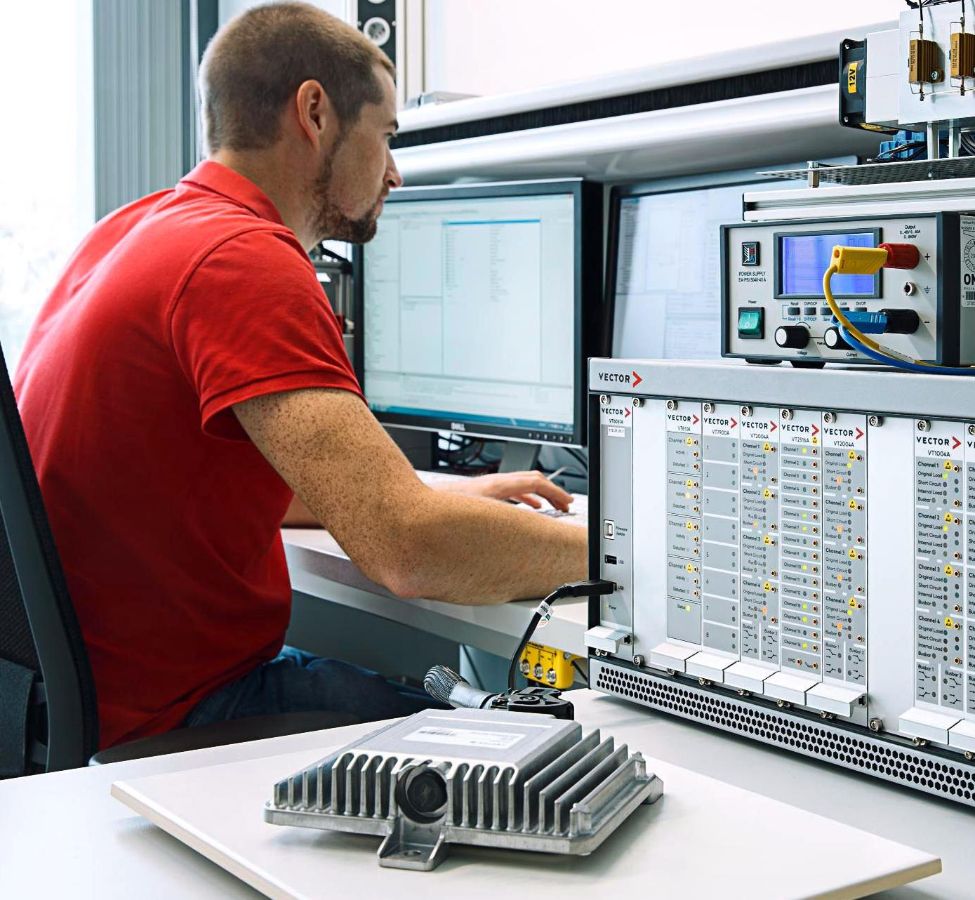
CANoe.DiVa is developed for use by all vehicle manufacturers and suppliers. DiVa also offers OEM-specific extensions and plug-ins. 
Application_Area.jpg

Suppliers

Suppliers and service providers benefit from a standardized test solution that can be used in different OEM projects. Open interfaces, e.g. for requirement tracking, offer integration into existing development processes. This not only increases development efficiency and software quality, but also achieves cross-project synergies and efficiency gains. 

Vehicle Manufacturers

Vehicle manufacturers receive a comprehensive and fine-grained insight into the current quality of diagnostic implementation at an early stage of development. A standardized test report across suppliers provides support and transparency. OEM extensions are used to explicitly safeguard manufacturer-specific applications and diagnostic features (already at the supplier).

Key Features

CANoe.DiVa provides test configuration, test generation, test result analysis support accompanied by requirement traceability and automated test control.

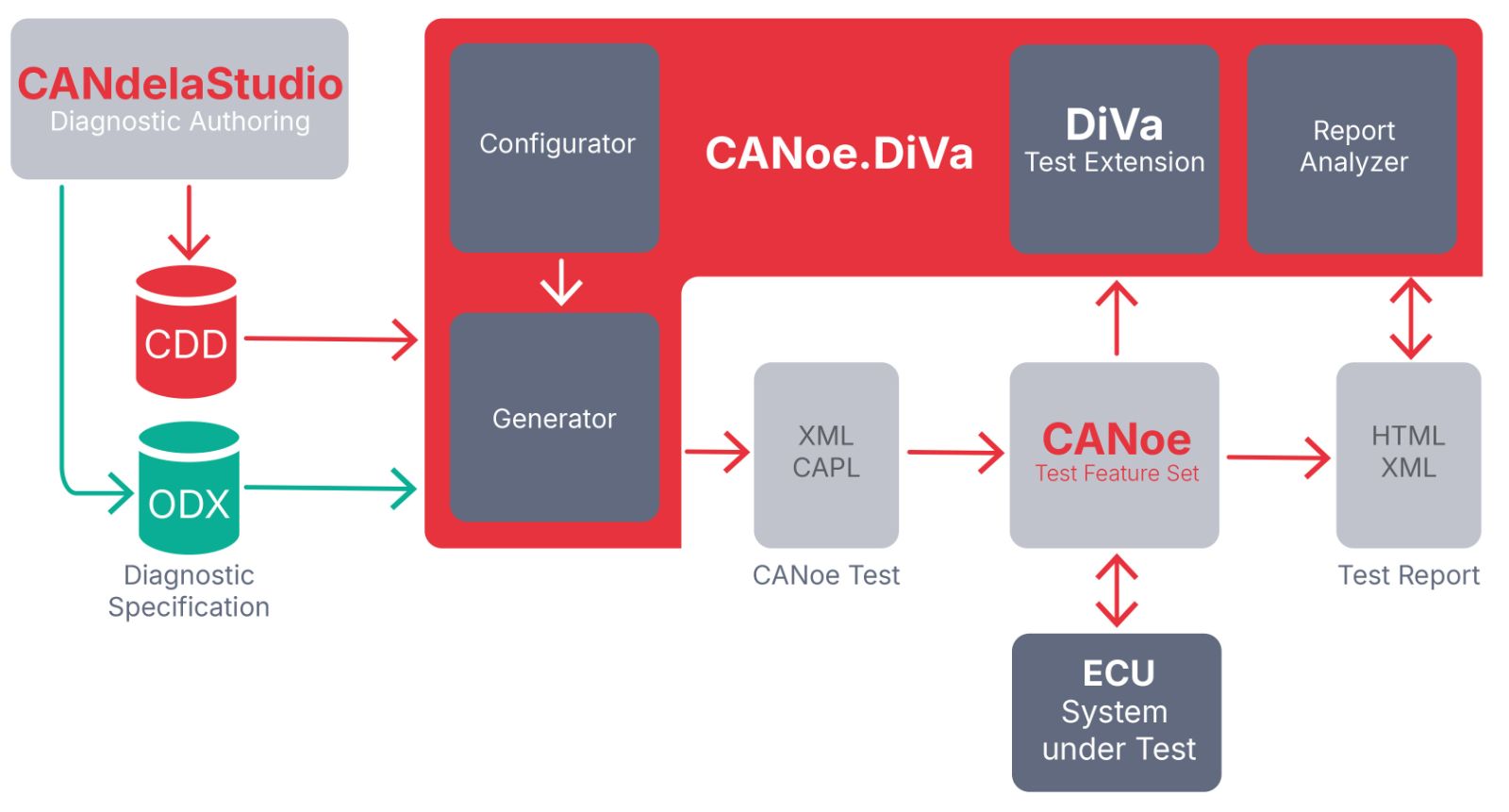
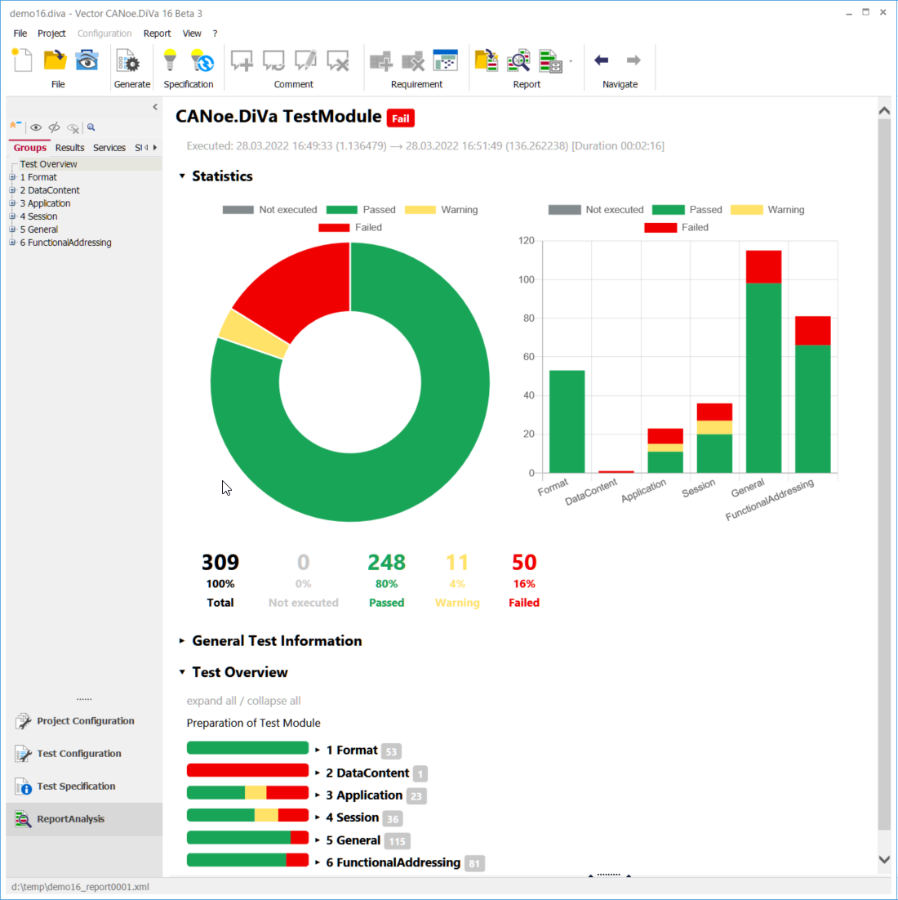
The generator uses diagnostic descriptions in ODX or CANdela format to generate comprehensive test cases in accordance to the configured test depth (good and bad cases). It generates a test environment that is added to a CANoe configuration, as well as a test specification with details on the test flow and the individual tests. The tests cover both protocol and application scope. The (re-) programming of ECUs for valid and invalid sequences is also checked. The execution results are documented in a clear report. The analysis of the test results is supported by CANoe.DiVa with mechanisms for sorting, comparing, filtering, commenting, requirement linking and post processing of tests and test results. Comments and requirements given by the user are persistently stored over sequential test runs.

OBD Tests

CANoe.DiVa automatically executes specific tests for OBD-capable ECUs at an early stage, as required and mandatory for the final vehicle acceptance test.

  • Early testing of the OBD2, OBDonUDS, ZEVonUDS or WWH-OBD protocol as well as the correct activation of the MIL (malfunction indicator lamp)
  • Automated execution of PVE (Production Vehicle Evaluation) test sequences
  • Automated execution of conformance tests in accordance with SAE J1699-3/-5 at ECU level

Protocol Validation

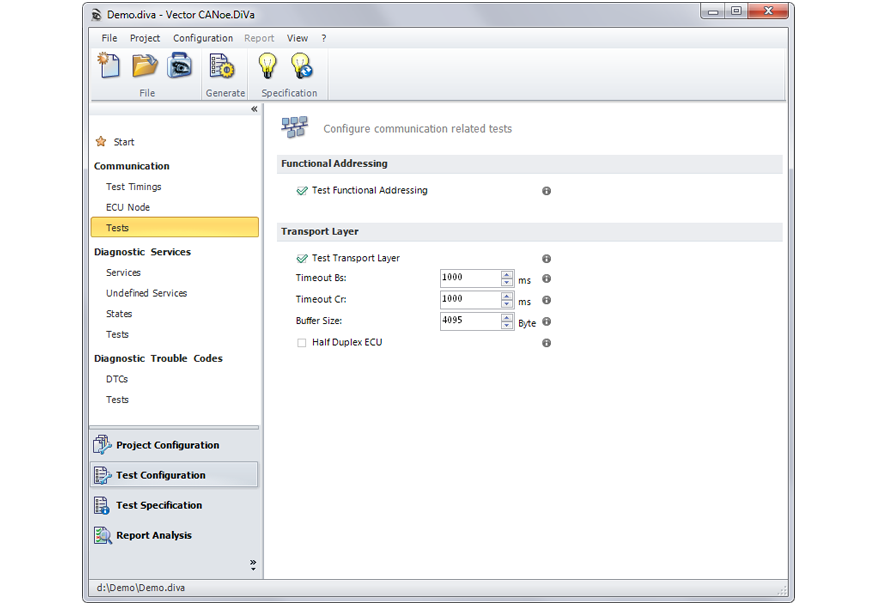
  • Physical/functional addressing and timing
  • Protocol format: Processing of valid and invalid requests
  • Execution or rejection of services at various session and security levels
  • Data types and value limits

Support of SOME/IP

Automated test generation & execution for all SOME/IP services and operations of an SUT:

  • Test generation based on AUTOSAR XML and Franca IDL
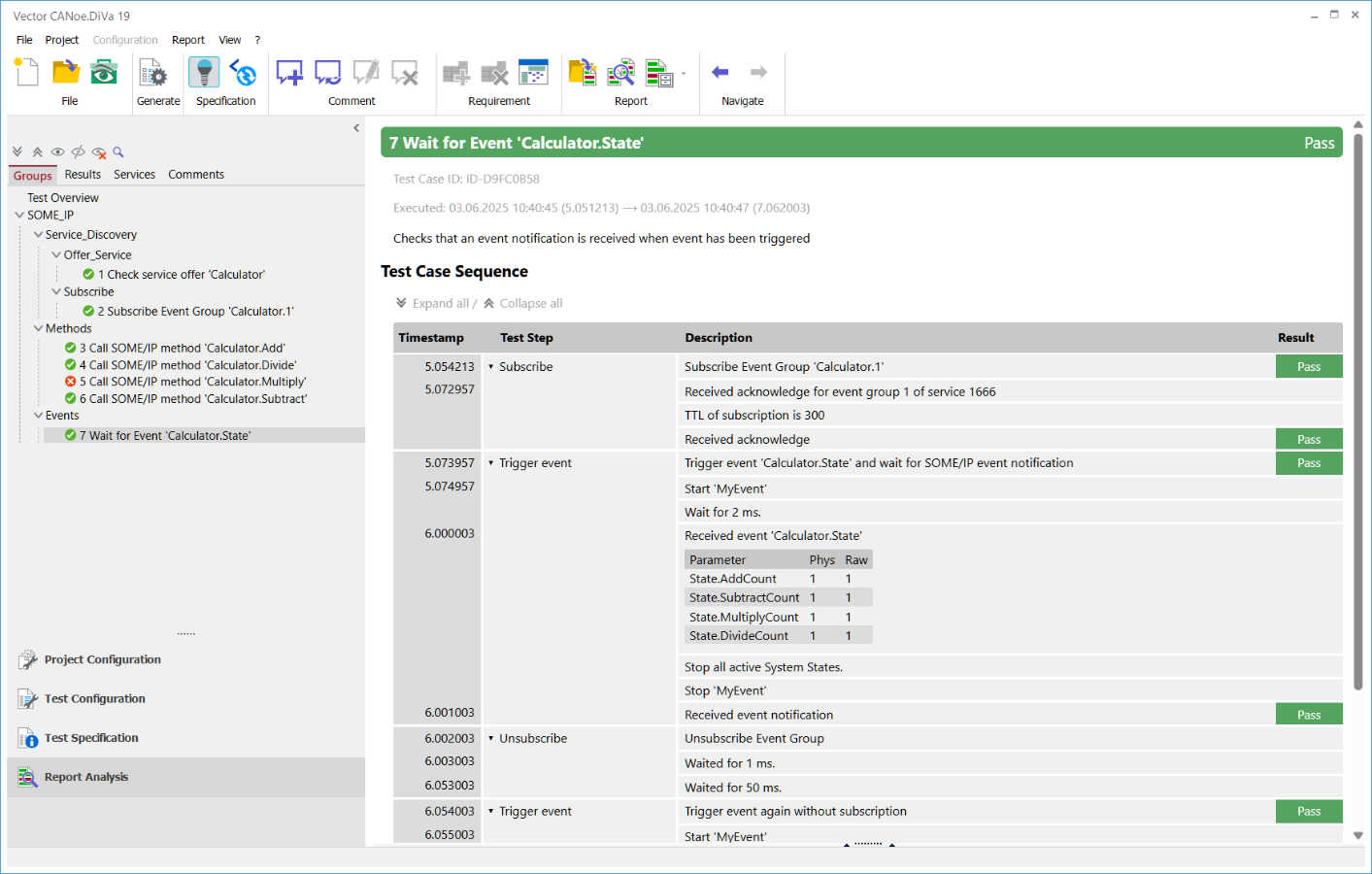
  • Support of all SOME/IP basic operations: “Find”, “Offer”, “Subscribe”, “Methods”, “Events” & “Fields”
  • Test of availability and correctness of all services
  • Test in combination with operating states, e.g. ignition on/off
  • Definable expected values, e.g. specific parameter values

Validation of Diagnostic Sequences

With CANoe.DiVa you can test ECU-specific diagnostic sequences in freely selectable system states (e.g. ignition on/off). Any diagnostic sequences from applications based on the ISO 22900-2 (D-PDU API) are supported - and of course all sequences implemented in VDS (Vector Diagnostic Scripting).

  • Continuous testing of diagnostic sequences and (D-PDU API) diagnostic systems within the CANoe test environment using CANoe‘s environment stimulation capabilities.
  • Evaluation and documentation of outputs of diagnostic sequences in the test report.
  • Checking of used diagnostic services against diagnostic specification: e.g. timing behavior, format, data contents.
  • Simple and fast setup of self-defined diagnostic sequences in VDS, e.g. via the CANoe Macro Recorder or the Indigo Script Recorder. Self-generated VDS scripts or sequences can also be used easily.

Validation of the Application: Diagnostic Parameter and Fault Memory

  • Parameter vs. parameter: Compare write/read
  • Compare parameters to expected values, e.g. values acquired over CCP/XCP
  • Compare parameter with I/O or network signals
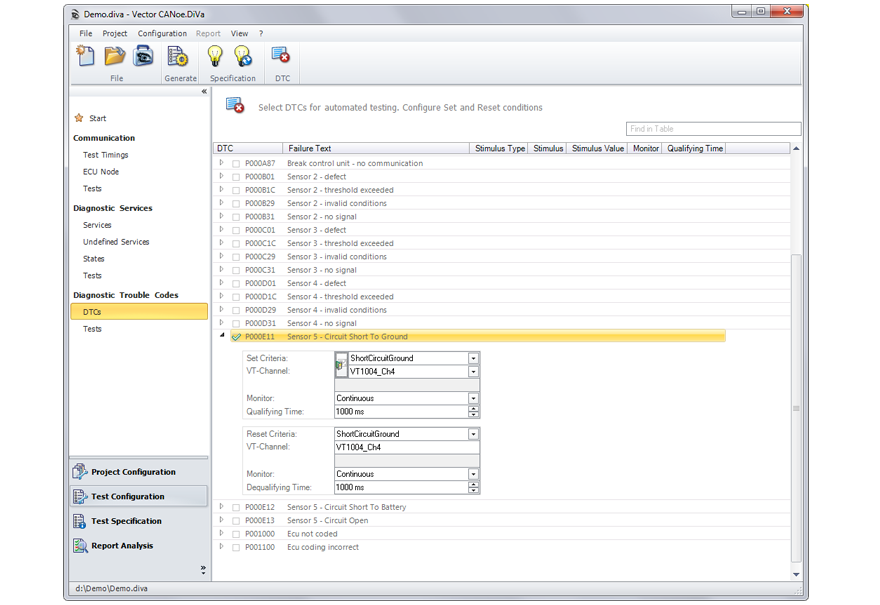
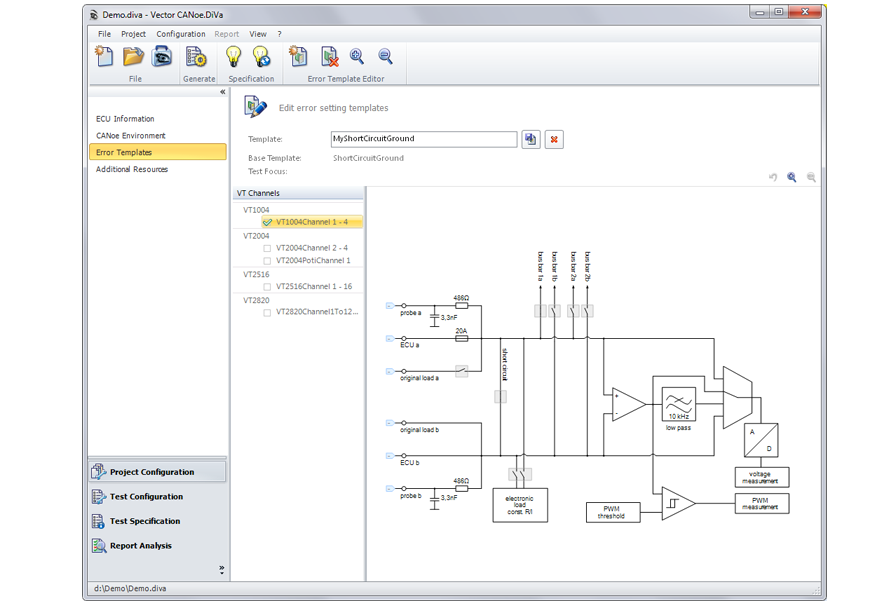
  • Provoke and reset error states automatically (network signal errors or electrical errors via VT System or other HIL)
  • Comprehensively check proper DTC setting, resetting and reporting, according to protocol and specification

Software Download Test

Validation of the flash programming of ECUs in conjunction with vFlash and D-PDU API based diagnostic testers. CANoe.DiVa can generate tests for the bootloader supported by vFlash. Vector offers prepared vFlash Templates for a large number of different automotive OEMs and bootloaders.

CANoe.DiVa generates, among others, the following tests:

  • Valid flashing and testing of diagnostic communication with regard to timing and format
  • Flashing when under / overvoltage
  • Abort the flash sequence at different points and targeted interruption of the power supply during flashing

Requirements Mapping

  • Creation of requirements or import of requirements from requirements systems (e.g., Doors) or test data management systems using the Vector Connection Utilities/AddIn of vTESTstudio
  • Generated tests can be mapped to requirements. This facilitates the tracking of the requirements
  • Display of all test results for individual requirements
  • Returning test results to the requirement or test data management system
  • Automated control of CANoe.DiVa for integration into an existing build and test environment (e.g. Jenkins or Subversion)

Security

  • Test of diagnostic authentication and service availability
  • Integration of Vector Security Manager. The Vector Security Manager provides OEM-specific security functions, e.g. for diagnostic authentication

Continuous Testing

Automated execution of CANoe.DiVa test cases in a virtual SW environment (Software in the Loop | SiL) or on the test bench (Hardware in the Loop | HiL)

Videos

Protocol-related: The video shows hints about a basic but quite important feature of CANoe.DiVa, the “State Dependencies”.
Protocol-related: The video shows how easy it is to create completely new state groups to describe more complex scenario.
Protocol-related: The video shows how to make sure that the vehicle ECU only implements diagnostic services that are defined in the diagnostic specification and not more.
Application-related: The video shows how to use a VT System setup to automatically test Diagnostic Trouble Codes (DTCs) using CANoe.DiVa.
Application-related: The video shows how to automatically validate the content of a diagnostic parameter using the VT System to stimulate and measure the IOs of an ECU.
Application-related: The video shows how to exchange or reuse DTC and Diagnostic Parameter test information. Reuse existing definitions e.g. in Excel for import in CANoe.DiVa.
Application-related: The video shows how to test valid and invalid preconditions of a diagnostic service or a DTC Using system conditions in CANoe.DiVa.
Application-related: The video shows how easy it is to use CANoe.DiVa to test diagnostic services under invalid conditions.
Jobs & SW-Update: The video shows how to use CANoe.DiVa to easily setup tests of ECU individual diagnostic sequences that are important e.g. for manufacturing, after-sales or OTA use cases.
Jobs & SW-Update: The video shows how to combine Vector vFlash and CANoe.DiVa to automatically generate software download tests.
Reporting: The video shows what you can do to get the best out of a test report if the vehicle ECU’s quality is bad or the diagnostic implementation is incomplete.
Reporting: The video shows how to exchange requirements and test results between CANoe.DiVa and established requirement or test data management systems.
Reporting: Learn how to use the “Comment” feature to structure and classify identified errors.
Reporting: The video shows how to use the report filter functionality to identify error patterns and get specific information from the report.
Reporting: The video shows how to exchange and archive test results using Archive Report and Archive Mini Report
Reporting: The video shows how CANoe.DiVa’s Service View can help you to improve the test depth. See how to configure Expectation Values to validate the diagnostic parameters contents.
Automation: The video shows how to use the command line to automate CANoe.DiVa test generation e.g. for regression test use cases.

Images

DiVa_schematic_graphic_new_CI.jpg
Overview CANoe.DiVa - Architecture and Test Generation
CANoe.DiVa_Testreport_2022.png
Test Report
CANoe.DiVa_18_Screen.png
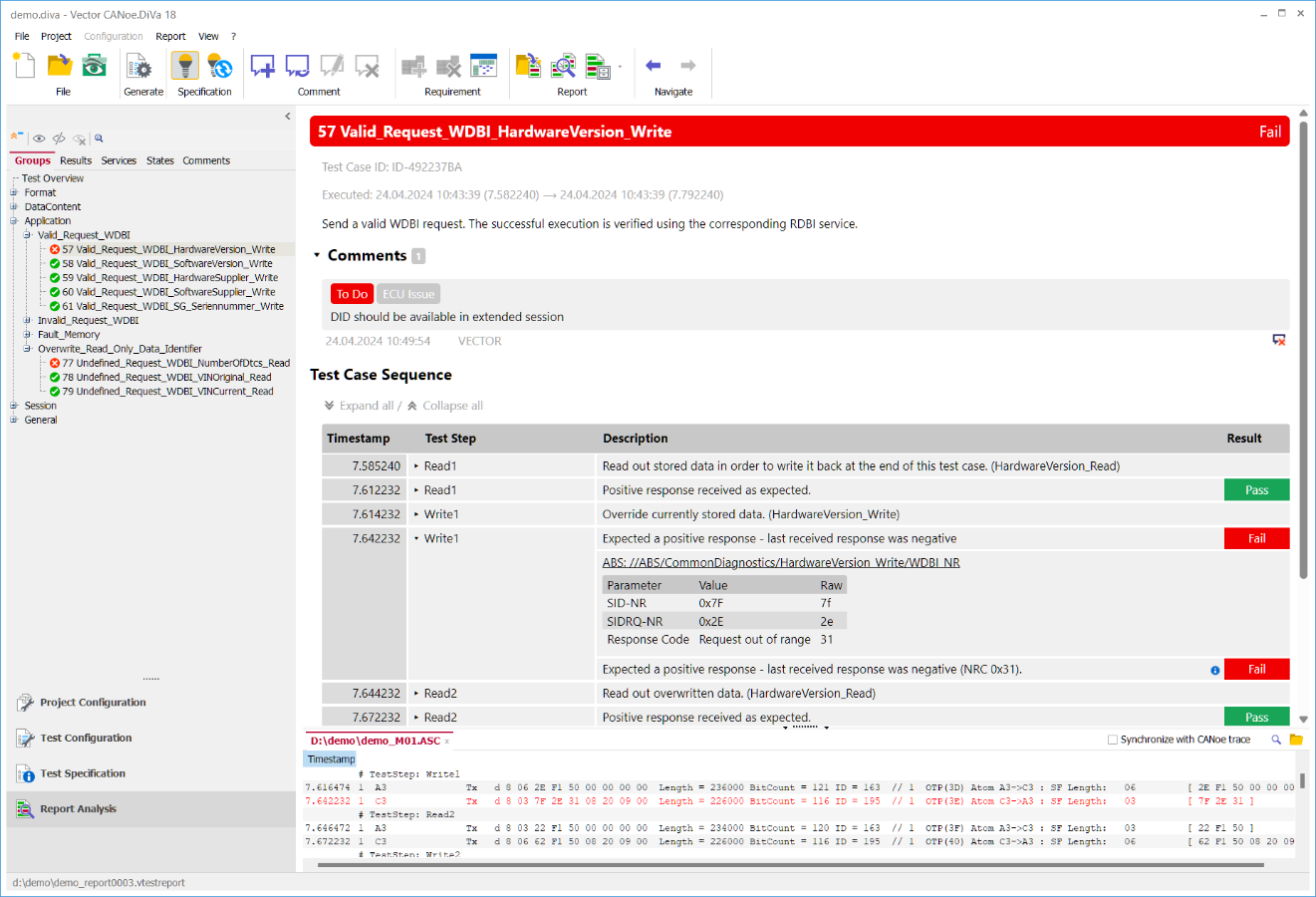
Report Analysis Groups View
CANoe_DiVa_SOME_IP.png
Support of SOME/IP
web_portal_diva41_dtctest.png
Automated Fault Memory Tests
web_portal_diva42_commtest.png
Communication related Tests
web_portal_diva43_error.png
VT-System Module Error Settings
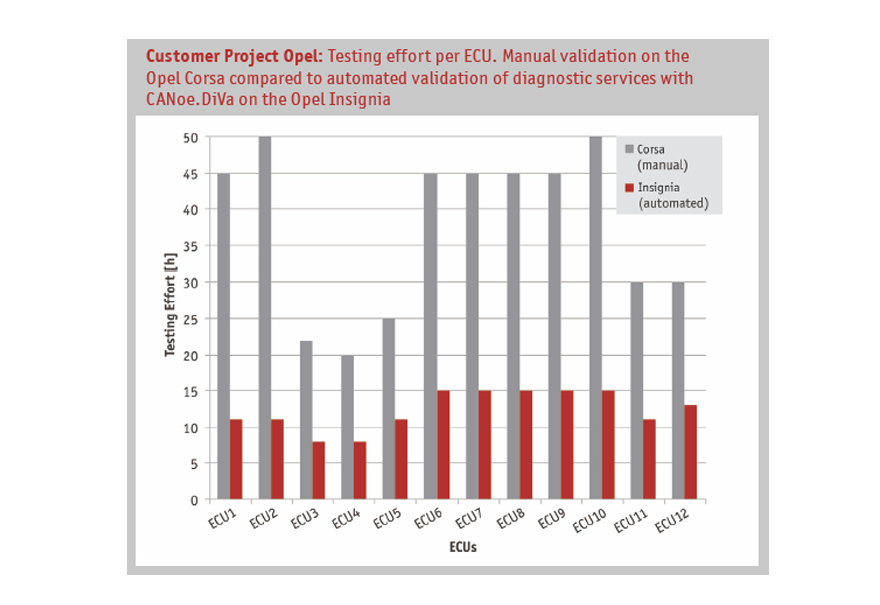
web_portal_diva5_opel_en.png
Test Effort Comparison: with and without CANoe.DiVa at Opel

Highlights of Version 20

From Test Results to Actionable Insights

CANoe.DiVa 20 introduces AI-supported capabilities to analyze & comment test results, map requirements and configure project settings in an autonomous efficient manner.

Instead of manually reviewing large volumes of findings, CANoe.DiVa helps identify similar error situations and group them with one consolidated comment.

AI-supported capabilities include in detail:

  • Automated analysis and commenting of test results
  • Grouping of similar error situations
  • Support for precise explanations based on requirements and OEM specifications
  • Automated requirement linking and traceability
  • Use of requirement information, diagnostic data, and test setup information
  • Automated configuration of extended test information e.g. as input for DTC testing

The result: faster evaluation, clearer traceability, and a stronger connection between requirements, test configuration, and test evidence.

Automated Testing for Service-Oriented Vehicle Diagnostics

SOVD is a key enabler for Software-Defined Vehicles (SDVs) and future vehicle diagnostics - and CANoe.DiVa 20 is ready to support you on this path.

With the new SOVD test support, CANoe.DiVa 20 enables automated validation of SOVD resource based on OpenAPI descriptions. It checks interface completeness, verifies protocol conformity, and validates diagnostic communication between HPCs, gateways, and UDS-based embedded ECUs.

CANoe.DiVa 20 supports three powerful SOVD testing perspectives:

  • Pure Interface Test
    Generate tests based on OpenAPI descriptions and validate the SOVD implementation of all available entities.
  • End-to-End Protocol Test
    Check whether diagnostic information remains consistent between SOVD and UDS communication.
  • End-to-End Application Test
    Validate whether changes in I/Os and application behavior on UDS-side are correctly reflected in SOVD values - including test setups with HIL, VT System, and CANoe Remaining Bus Simulation.

This helps you build confidence in service-oriented diagnostic architectures - from interface validation to real system behavior.

Linux Support for Test Generation in CANoe Server Edition

CANoe.DiVa 20 extends test generation to Linux environments in CANoe SE.

This gives development and validation teams more flexibility in toolchain design and enables technical advantages in automated environments - without requiring a Windows license for test generation.

For teams working with modern CI/CT pipelines, containerized environments, or software-centric validation workflows, this is an important step toward more scalable diagnostic testing.

Diagnostic Validation for Pure Software-Based Testing

With CANoe4SW .DiVa, CANoe.DiVa 20 supports pure software-based diagnostic testing.

This enables you to shift diagnostic validation earlier into the development process - even before physical hardware is available. You can test diagnostic behavior in software-centric environments and create a smoother transition from virtual validation to HiL system testing, and vehicle testing.

Compliance Testing on Vehicle Level: J1699-3 (OBD2) und J1699-5 (OBDonUDS/ZEVonUDS)

CANoe.DiVa 20 expands automated OBD compliance testing with support for J1699-3/-5 compliance tests on vehicle level.

You can now automate compliance test execution not only on component level, but also directly on the vehicle. This helps you validate OBD behavior more consistently across development stages and supports a more efficient path toward regulatory readiness.

Product Editions

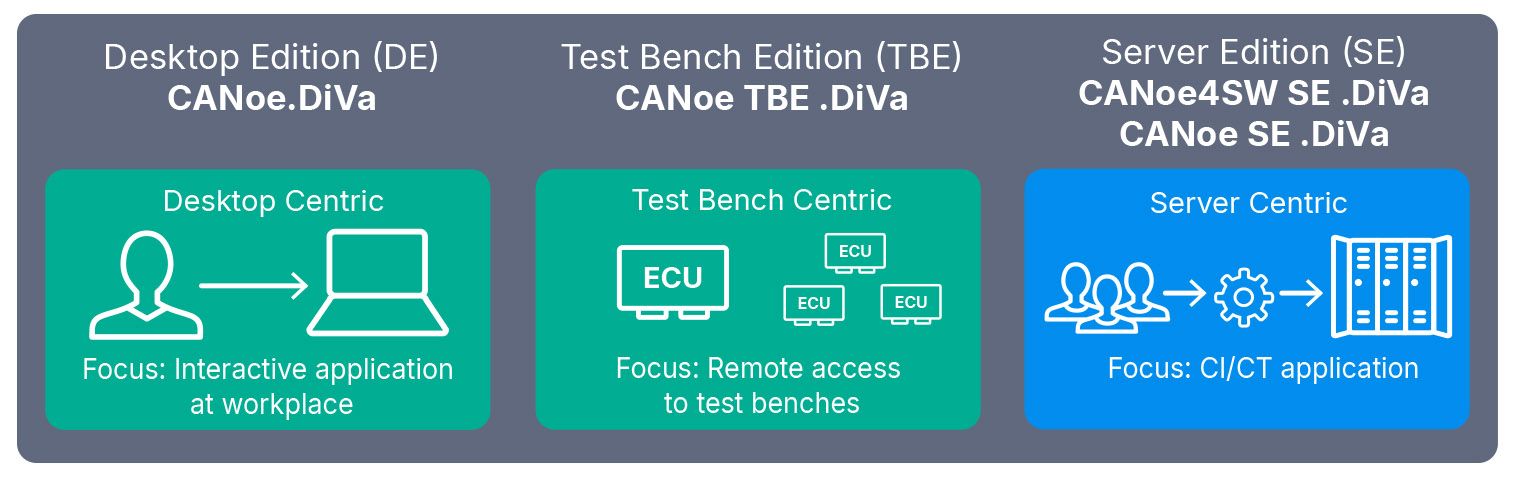
Tailored for your defined purposes, CANoe.DiVa has the right product edition for you:

  • Interactive work ⇒ Desktop Edition (DE)
  • Test/production workstation (HiL) ⇒ Test Bench Edition (TBE)
  • Automated CI/CT environments (SiL/HiL) ⇒ Server Edition (SE)
DiVa_Editions_new_CI.jpg

Editions & Variants

Desktop Edition:
CANoe.DiVa

Workplace tool:

  • Configure, create and execute diagnostic tests
  • Evaluate and post-process test results

Required CANoe edition/variant: CANoe DE /pro/pex/run

Test Bench Edition:
CANoe TBE .DiVa

Tool for one test bench environment in real time:

  • Configure, create and execute diagnostic tests
  • Evaluate and post-process test results (in relation to the test bench application)

Required CANoe edition/variant: CANoe TBE /pro/pex/run

Server Edition:
CANoe4SW SE .DiVa
CANoe SE .DiVa

Automatic test setup & execution, e.g. on a server. Test of virtual and real ECUs:

  • Continuous integration & continuous testing
  • Highly scalable: fastest possible execution and parallel test execution

Required CANoe edition/variant: CANoe4SW SE | CANoe SE

Supported Diagnostic Standards and Protocols

  • CAN/CAN FD, FlexRay, DoIP, LIN, etc.
  • ISO 14229 (UDS): 2006/2013/2020,
  • ISO 15765 (Diagnostics on CAN),
  • ASAM SOVD / ISO 17978-3,
  • SAE J1979 /-2/-3 (OBD2, OBDonUDS and ZEVonUDS),
  • SAE J1699-3/-5 (Compliance Test)
  • ISO 14230 (KWP2000),
  • ISO 27145 (WWH-OBD),
  • SOME/IP
  • Specific test support for numerous automotive OEMs:
    Beside the general diagnostic tests (e.g. for ISO 14229) CANoe.DiVa also offers additional test support for many OEMs.
Start a Conversation
Pascale Morizur
Business Development Manager Diagnostics & Flashing
Start a Conversation
Are you interested in solutions and tools for next generation diagnostics & flashing? Then lets talk!

Request a Trial Version

Related Products