CANoe Server Editions are server‑based variants of CANoe that execute simulations and tests in automated, headless environments. They provide the foundation for continuous and scalable testing from Software‑in‑the‑Loop to Hardware‑in‑the‑Loop workflows and logfile analysis.
They are designed for developer teams who need to use test execution directly into CI/CD pipelines with scalable automated test workflows.
Advantages
CANoe Server Editions bring consistency and scalability to test automation. These highlights support teams who need to validate complex systems efficiently and reliably.
- Everything as Code – Seamless code-centric collaboration through diff & merge enables AI-driven workflows based on text-based configurations.
- Cross-platform support – Available for Windows and Linux environments.
- Automated SIL and HIL testing – Execute tests without manual interaction.
- CI/CD integration – Control test execution via simple commands.
- Scalable execution environments – Run tests locally, on-premise servers, or in cloud-based setups, including parallel execution.

Automated CANoe Testing in Everyday DevOps Workflows
CANoe Server Editions deliver a streamlined, innovative DevOps workflow for product teams looking to accelerate automated testing. With full script control and YAML-based configuration, simulations and tests are executed seamlessly. There is no graphical interface required. This headless approach enables effortless automation and integration, perfectly suited for scalable continuous integration and testing environments.
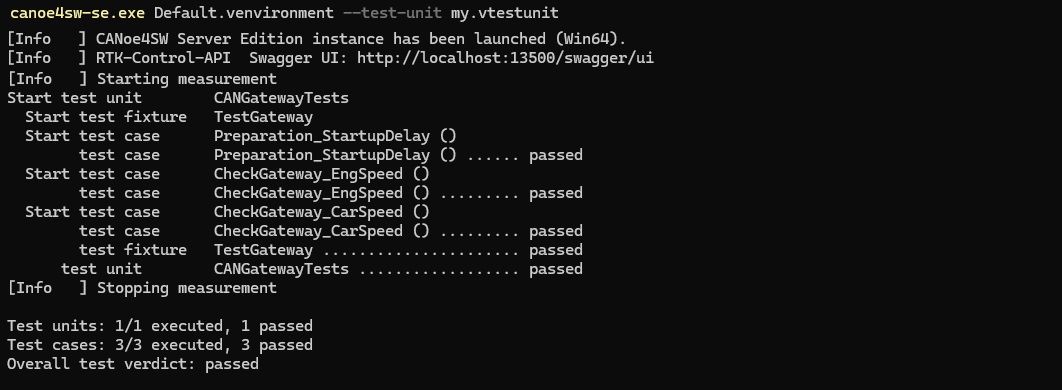
At the heart of this workflow lies a clear separation between environment and test logic. By decoupling these elements, teams gain flexibility: tests are reusable across projects and environments, compile once, and run in parallel. This modular approach supports rapid scaling and robust automation in CI/CD pipelines.
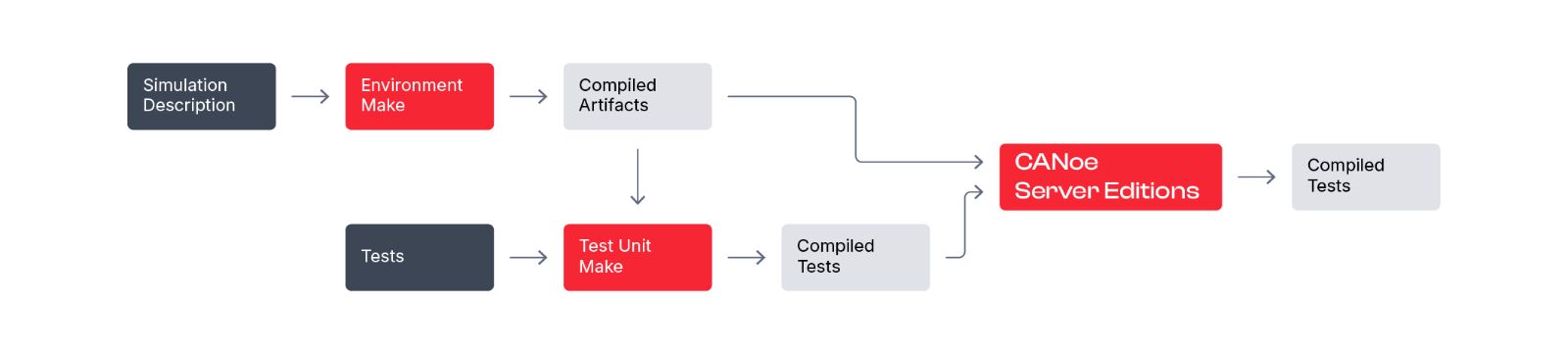
CANoe Server Editions are designed for fast, reliable integration into your development toolchain. With a single command, simulations and tests are launched and results are generated automatically. This reduces manual effort and ensures consistent outcomes.
The DevOps Workflow at a Glance
- Environment Make – Compiles the simulation description and prepares the execution environment.
- Test Unit Make – Compiles tests for a specific environment, independently from the simulation logic.
- CANoe Server Editions – Run simulation and tests in a fully automated, headless mode, generating comprehensive test results for downstream analysis.
Experience scalable, reproducible, and transparent test automation that adapts to your needs. This makes CANoe Server Editions the foundation for efficient DevOps in embedded development.
Use Cases
Software-in-the-Loop (SIL)
CANoe Server Editions support the virtualization of virtually any ECU, including setups based on SIL Kit as well as vVIRTUALtarget or Synopsys Silver. This enables early testing with fast feedback cycles and increases efficiency through parallel test execution and variant testing.

Hardware-in-the-Loop (HIL)
CANoe Server Editions extend automated workflows to Hardware-in-the-Loop environments, enabling realistic validation under real hardware conditions. They integrate seamlessly into existing HIL test systems and support any HIL hardware through CANoe Open Environment. This allows teams to scale automated test execution efficiently across HIL farms.

Logfile Analysis
CANoe Server Editions automate logfile analysis, enabling teams to evaluate recorded data efficiently without manual effort. This provides fast feedback after test drives and allows individual validation checks to be integrated directly into automated workflows.
Key Features
YAML-Based Configuration (Everything as Code)
Describe test environments, execution parameters, and variants in version-controlled configuration files.
Development Tool Integration
Support for modern development environments, including Visual Studio Code Extensions.
Operating System Support
Available for Windows and Linux platforms.
Command-Line and API Control
Trigger, control, and monitor test runs using CLI commands or programmatic interfaces for simple integration.
Multi-Language Test Authoring
Create and execute tests using CAPL, Python, or C#, depending on project needs and team preferences.
Highlights Version 20
- New Options Sensor, J1939, For EtherCAT, SDC, CANopen, and ISO11783
- Extended Linux support
- Debian Packages
- Linux Driver for VN5650
- Vector Tools Platform (Coordinator)
- .NET API, Python, FMI, Diagnostic
- Support of OCI (vdpm)
- Volume License
- FMI 3.0
TechTutorials
Product Description
| Recommendation | |
| Processor |
|
| Memory (RAM) | 4 GB per Instance |
| Hard disc | SSD/NVMe |
| Windows operating system |
|
| Linux operating system |
|
Downloads
Related Pages

CANoe
vTESTstudio
vVIRTUALtarget